What is e-commerce image optimization?
E-commerce image optimization is the process of turning raw product photos into files that meet each sales channel's rules, load quickly, look consistent across a catalog and can be traced back to the right product. In practice it means five decisions made the same way every time: dimensions and crop, file format, compression level, color profile and metadata, and file naming.
The hard part is not any single conversion. It is repeating those five decisions for hundreds of SKUs, every restock, across Shopify, Amazon and Etsy, without one product ending up blurry, oversized, off-color or misnamed. That is why this hub treats product images as a batch pipeline rather than a one-off edit, and it sits inside the wider set of batch image tools for Mac that handle conversion, resizing and compression.
On a Mac you can do all of it locally. Operimage, a free Mac app, resizes, compresses, converts, removes backgrounds, watermarks and renames whole folders on-device, so an unreleased catalog never has to be uploaded to a web converter.
- 1Raw product photosHEIC or JPG masters, one folder per shoot
- 2Resize per channel2048² Shopify · 1000 px+ Amazon · 3000×2250 Etsy
- 3Compress + cleansRGB JPG ~80%, EXIF/GPS stripped
- 4Rename + exportSKU-variant-angle names, one folder per channel
Product image requirements by platform at a glance
Each marketplace publishes its own guidance, and the three biggest ones for small and mid-size sellers point in slightly different directions. Shopify recommends square 2048×2048 px product images so zoom works and grids line up. Amazon requires at least 1000 px on the longest side to enable zoom, a pure white background (RGB 255,255,255) on the main image, and the product filling about 85% of the frame. Etsy recommends at least 2000 px on the shortest side and shows listing photos at 4:3 in search, so 3000×2250 px is a common target.
The sensible approach is to treat these as export targets from one master set, not as separate shoots. Open the platform guide that matches where you sell for the detail: Selling on eBay too? The eBay photo rules differ in a few important ways.
- Shopify storefronts: format choice, compression budgets and theme behavior are covered in Shopify image optimization on Mac, and square crops for collection grids in the Shopify product image resizer guide.
- Amazon listings: main versus secondary image rules, zoom resolution and file naming for bulk upload are in the Amazon product image requirements guide.
- Etsy shops: the 4:3 search crop, thumbnail adjustment and file weight are in the guide to sizing Etsy listing photos.
- Your own site or WooCommerce: follow the Shopify defaults (square, 2048 px, sRGB JPG) unless your theme specifies another ratio.
Well-established image guidance by platform (check each help center for current limits)
| Platform | Recommended size | Shape | Background | Common formats |
|---|---|---|---|---|
| Shopify | 2048 × 2048 px | Square 1:1 recommended | Any, consistent across catalog | JPG, PNG, WebP, GIF |
| Amazon | 1000 px+ longest side for zoom | Any; product fills ~85% | Main image pure white 255,255,255 | JPEG preferred; PNG, TIFF, GIF |
| Etsy | 2000 px+ shortest side (e.g. 3000 × 2250) | 4:3 landscape shown in search | Any; lead photo should read small | JPG, PNG, GIF |
- Shopify product2048 × 2048 · 1:1
- Amazon zoom minimum1000 × 1000 · 1000 px longest side
- Etsy listing3000 × 2250 · 4:3
Why optimized product images matter for sales and speed
Product images do two jobs at once. They sell the item, because shoppers cannot touch it, and they are usually the heaviest part of a product page. A 6 MB straight-from-camera photo forces a phone on a cellular connection to download far more data than the screen can show, which slows Largest Contentful Paint, one of Google's Core Web Vitals.
Consistency is the other half. A collection grid where one product is cropped tight, another floats in white space and a third is a different aspect ratio looks unfinished, and marketplace search pages make those differences obvious because every listing sits side by side. A fixed pipeline fixes both problems: every image hits the same dimensions, the same framing rules and a predictable file weight.
Which file format should product images use?
JPG in the sRGB color space is the safe default for product photos on every major platform. It is accepted everywhere, compresses photographic detail well and displays the same in every browser. PNG is the right choice only when you need transparency, such as a cutout to place on colored banners, or for flat graphics with text; for a normal photo, PNG files are typically several times larger than a JPG of the same visual quality.
WebP and AVIF produce smaller files at similar quality, and they are worth using on your own website. On hosted platforms they matter less: Shopify's image CDN already serves resized, modern-format versions to browsers that support them, and marketplaces such as Amazon and Etsy document JPG, PNG and GIF (plus TIFF on Amazon), so upload a high-quality JPG there. iPhone HEIC files should be converted before upload; the HEIC to JPG guide covers that step in bulk.
JPG (sRGB)
Default for photos
- Accepted by Shopify, Amazon, Etsy and WooCommerce
- Small files at 75–85% quality
- No transparency: background must be part of the photo
PNG
Only for cutouts and graphics
- Keeps transparency for layered banners and cutouts
- Lossless, so photo files are much larger
- Good for size charts, diagrams and text overlays
Verdict: Upload JPG for product photos; keep PNG for transparent assets and graphics.
How big should product image files be?
There is no single official number, but a 2048×2048 px product photo saved as JPG at around 80% quality typically lands in the low hundreds of KB, and white-background studio shots compress smaller than busy lifestyle scenes. Aim for a few hundred KB per gallery image and keep anything over 1 MB as the exception. Amazon and Etsy care more about resolution than file weight, but lighter files still upload faster and Etsy suggests keeping files modest.
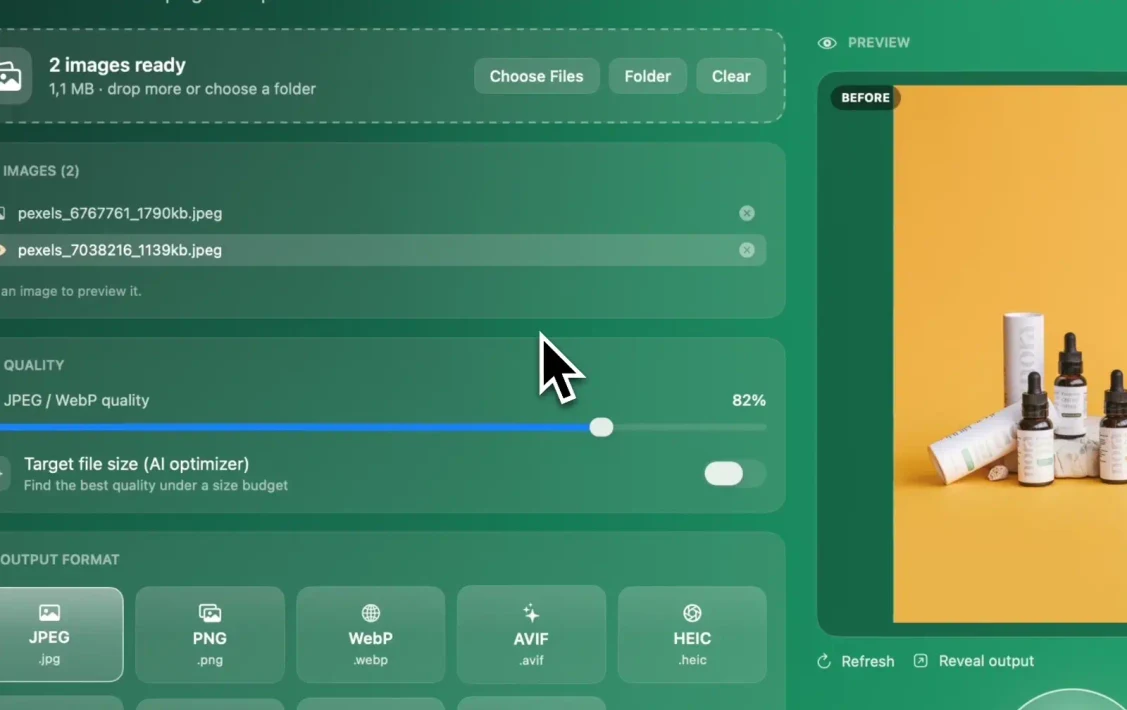
Rather than guessing a quality number per photo, set a budget. Target-size compression searches for the highest quality that fits under a KB limit, which keeps detailed products sharp while plain products shrink further. In Operimage this is the Target file size (AI optimizer) option in Compress.
Always compress from the master, never from a file that was already compressed. Each JPG re-save adds artifacts, and zoom on Amazon and Etsy magnifies them.
Color profiles, metadata and privacy
Recent iPhones and many cameras capture in the wide Display P3 color space. Browsers color-manage embedded profiles, but marketplace processing, email clients and some feeds do not handle them consistently, so a red product can look dull or shifted. Converting everything to sRGB before upload makes the color you approved on your Mac the color shoppers see.
Photos also carry EXIF metadata: camera model, capture time and, for phone shots, GPS coordinates of where the photo was taken. If you photograph products at home, that location can travel with a public file. Removing it is a single option in a batch export; the guide to strip EXIF and GPS data on Mac explains what gets removed and how to verify it.
Backgrounds, cutouts and watermarks
A clean, consistent background is the single biggest visual upgrade for most catalogs. Amazon requires pure white for the main image; Shopify and Etsy leave it to you, but a uniform background across a collection reads as professional. If your photos were shot on a table or a gray sweep, an on-device background remover can produce transparent cutouts in batch, which you then place on white or on a brand color.
Watermarks are a channel-by-channel decision. Amazon does not allow logos or watermarks on the main image, and most stores keep product photos clean because a watermark distracts from the product. If you do want to mark lifestyle shots shared on social media or wholesale sheets, add a logo watermark to a whole batch with low opacity in a corner, as a separate export from your marketplace set.
Naming files and organizing folders
Filenames are the glue between your photos and your catalog. A name such as tee-crew-navy-m-front-01.jpg tells a teammate, an upload tool and a search engine what the image shows, while IMG_4821.jpg tells nobody anything. Google describes filenames as a light hint about image content, and Amazon's bulk image upload relies on names that start with the product identifier.
Pick one pattern, usually SKU or product handle, then variant, then angle or sequence number, and apply it in the same batch as resizing so the output never exists with a temporary name. The product image naming convention guide has ready patterns for Shopify, Amazon and Etsy.
- Use lowercase letters, numbers and hyphens; avoid spaces, accents and symbols.
- Zero-pad sequence numbers (01, 02 … 10) so files sort in gallery order.
- Keep one folder per channel export so an Amazon set is never uploaded to Etsy by mistake.
- Never overwrite masters; write optimized copies to a separate output folder.
Can you optimize product images with built-in Mac tools?
For a handful of photos, yes. Preview on macOS can open several images at once, resize them together with Tools › Adjust Size, and export to JPEG with a quality slider. Finder's Quick Actions include Convert Image, which converts selected files to JPEG, PNG or HEIF at a few preset sizes, and Finder can batch rename selected files with a name and index. The Shortcuts app can chain resize and convert actions for repeat jobs.
In Terminal, the built-in sips tool resizes the longest side with a command such as sips -Z 2048 *.jpg, but it edits files in place unless you add --out with a destination folder, so work on copies.
These tools run out of road when the job combines exact square output, compression to a size budget, metadata stripping, background removal and SKU naming across several hundred files. That is the point where a dedicated batch app saves real time, because every step lives in one place with a preview before anything is written.
How to batch-optimize a product catalog in Operimage
Operimage runs each step as a sidebar tool and lets you chain them. Drop a product folder onto the window (the status line reads, for example, 412 images ready), click any image to see the Before/After preview, then run the tools in order: Resize with Manual resize to exact dimensions, Compress with a quality value or a target file size and metadata stripping on, and Rename with the Shopify, Amazon or WooCommerce pack.
Once the result looks right, save those steps as a Workflow. The next shoot then goes through the identical resize, compress and rename chain with one action, and Reveal output opens the finished folder in Finder. Originals are not overwritten unless you choose to, and all processing is on-device.
Pre-upload QA checklist for product images
Ten minutes of checking before upload prevents the most common listing problems: suppressed Amazon main images, blurry zoom, cut-off Etsy thumbnails and broken Shopify grids. Open a sample of the output, including your most awkward products (tall bottles, wide rugs, reflective items), and walk through the list below.
Before you upload
- Dimensions match the channel: 2048² Shopify, 1000 px+ Amazon, 2000 px+ shortest side Etsy
- Amazon main images sit on pure white 255,255,255 with no text, logos or props
- Product is centered with margin so square and 4:3 crops do not cut it
- Files are sRGB JPG and mostly a few hundred KB
- EXIF/GPS metadata removed
- Filenames follow the SKU-variant-angle pattern with no duplicates
- Masters are untouched in their original folder
Troubleshooting common product image problems
Most problems trace back to one of a few causes, and each has a direct fix.
- Images look soft after upload: the export was smaller than the platform's display or zoom size. Re-export from the master at full target size.
- Colors look washed out or shifted: the file kept a Display P3 or Adobe RGB profile. Convert to sRGB and re-export.
- Amazon flags the main image: the background is near-white (for example 250,250,250) rather than pure white, or a shadow touches the edge. Check pixels with Digital Color Meter in macOS Utilities.
- Etsy thumbnail cuts off the product: the item sits near the edge. Re-frame with more margin or adjust the thumbnail in the listing editor.
- Transparent PNG turns black or gray somewhere: the destination flattened transparency. Upload a JPG with the background color baked in instead.
- Gallery order is scrambled: sequence numbers were not zero-padded, so 10 sorted before 2.
Step by step
Collect product photos into one source folder
Group raw shots, often iPhone HEIC or camera JPG, into a folder per product or per shoot, then drop the folder into Operimage. Subfolders and the folder structure can be kept.
Resize for the target channel
In Resize, use Manual resize with exact dimensions, for example 2048×2048 for Shopify, at least 1000 px on the longest side for Amazon, or 3000×2250 for Etsy. Check the Before/After preview on a few products.
Compress and strip metadata
In Compress, set JPEG quality around 80% or use Target file size to stay under a KB budget, keep JPEG as the output, and enable metadata stripping so EXIF and GPS data are removed.
Rename with an e-commerce pack
In Rename, pick the Shopify, Amazon or WooCommerce pack, check the live name preview, and let Operimage sort files into folders if you need one folder per product.
Save it as a workflow and reveal the output
Save the resize, compress and rename steps as a Workflow so the next batch reruns identically, then click Reveal output to open the finished files in Finder for upload.
FAQ
What is the best image size for e-commerce?
A 2048×2048 px square is the most broadly useful product image size: it matches Shopify's recommendation, clears Amazon's 1000 px zoom minimum and works on most themes. Etsy favors 4:3 images with at least 2000 px on the shortest side, so export a separate set for Etsy.
What format should product photos be?
JPG in the sRGB color space is the safe default on every major platform. Use PNG only when you need transparency or for flat graphics, and convert iPhone HEIC files to JPG before uploading.
How large should product image files be in KB?
A few hundred KB per image is a practical target for a 2048 px JPG at around 80% quality. White-background shots usually come in smaller, and anything over 1 MB is worth recompressing.
Do Amazon and Etsy need the same image settings?
No. Amazon needs a pure white main image and at least 1000 px on the longest side for zoom, while Etsy recommends 2000 px or more on the shortest side and displays photos at 4:3 in search. Keep one master set and export a version for each.
Should I strip metadata from product images?
Yes. Stripping EXIF and GPS data removes camera details and the location where a photo was taken from public files, with no visible change to the image.
Can I optimize hundreds of product images at once on a Mac?
Yes. A batch app such as Operimage resizes, compresses, renames and exports whole folders on-device, and a saved workflow lets you rerun the same steps on every new shoot.
Does image file name matter for SEO?
It helps a little. Google treats descriptive filenames as a light hint about what an image shows, so a name like oak-side-table-front.jpg is better than IMG_4821.jpg, and alt text still matters more.