Convert
How to Convert HEIC to JPG on Mac (One Photo or Thousands)
Convert HEIC to JPG on Mac with Preview, Finder, Photos, sips or a batch app. The right quality setting, how to strip GPS, and fixes for common issues.
Free Mac app · Works offline
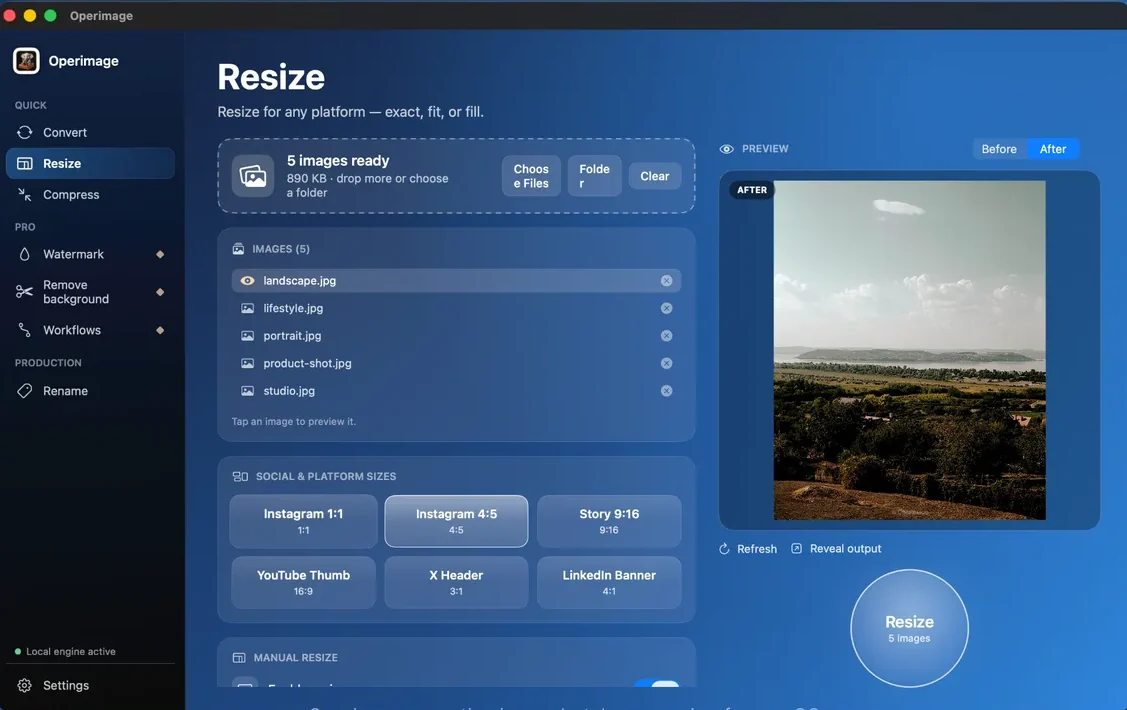
Drop in a folder, choose what to do — convert, resize, compress, watermark or rename — and press one button. Operimage handles every file on your Mac. Nothing is uploaded.
What it does
Before
Operimage

After
Your originals stay untouched. Operimage writes new files and can keep your subfolders as they are.
Tools
Each tool works on one photo or ten thousand, with a live before/after preview.
Change the format of every image in a folder: HEIC, WebP, AVIF, PNG, JPG, TIFF, GIF, BMP or PDF.
Format conversion guideMake every photo the same size, or use ready presets for Instagram, Stories, YouTube, X and LinkedIn.
Batch resizing guideShrink file sizes for the web and email. Set a quality, or a size limit and let Operimage find the best quality under it.
Compression guideCut out people and products with on-device AI and export transparent PNG or WebP files.
Background removal guideAdd your name or logo to every image, in the same place, at the same size and opacity.
Watermarking guideGive files clean, consistent names with counters and templates, including Shopify, Amazon and WooCommerce styles.
Batch renaming guideHow it works
Drag files or a whole folder into the window. Subfolders come along.
Pick a format, a size, a file-size limit, a watermark or a naming rule.
Check the before/after preview, then export. Your originals stay as they were.
Why Operimage
Download it from the Mac App Store and start. No account, no sign-up, no upload limits.
Every image is processed on your Mac. Client photos, products and personal pictures never touch a server.
Thousands of files in one run, subfolders kept, originals never overwritten unless you ask.
Compare
Other good Mac tools, side by side. Operimage puts every everyday batch job in one free app.
| Feature | Operimage | Permute | Retrobatch | Squash | Preview |
|---|---|---|---|---|---|
| Free to download | — | — | — | ||
| Batch whole folders | Selected files | ||||
| Convert, resize, compress, watermark and rename in one app | — | Build your own workflow | — | — | |
| Social media size presets | — | Manual setup | — | — | |
| AI background removal | — | Workflow node | — | One image at a time | |
| Works offline |
Guides
Step-by-step guides for the jobs people use Operimage for most.
Convert
Convert HEIC to JPG on Mac with Preview, Finder, Photos, sips or a batch app. The right quality setting, how to strip GPS, and fixes for common issues.

Resize
Resize images for Instagram on Mac in batch: 1080×1350 portrait, 1080×1080 square, 1080×1920 Stories, the 3:4 grid crop and safe zones explained.
Compress
Compress images on Mac for free without uploading them: Preview, Photos and sips, which quality to pick, and an offline batch workflow that hits size limits.
FAQ
Operimage is a native Mac app for editing many images at once. It converts formats, resizes, compresses, adds watermarks, renames files and removes backgrounds for whole folders in one run, entirely on your Mac.
Yes. Operimage is a free download on the Mac App Store. There is no account to create and no sign-up.
No. All processing happens on your Mac, so it works offline and your images never leave your computer.
Yes. Drop a folder of iPhone HEIC photos, choose JPG (or PNG, WebP, AVIF), set the quality once and export the whole folder in one pass with folder structure and file names kept.
Whole folders, including subfolders. Operimage is built for large batches of thousands of files in a single run.
No. Operimage writes new files to the output folder you choose and leaves the originals as they are, unless you explicitly turn overwriting on.
Any Mac with macOS 12 Monterey or later, on Apple Silicon and Intel.
Yes. You can use Operimage for personal and commercial work, including client photos and online stores.
Free on the Mac App Store. No account. Nothing uploaded.
Download on theMac App Store