What is a good product image naming convention?
A good product image naming convention puts the same three pieces of information in the same order in every filename: which product it is, which variant, and which view or position in the gallery. Written in lowercase with hyphens, that looks like tee-crew-navy-front-01.jpg or SKU1042-navy-02.jpg. Anyone can tell what the file shows without opening it, files for one product sort together, and gallery order is unambiguous.
The convention matters most when it is applied automatically, in the same batch that resizes and compresses the images, so no file ever reaches your upload folder as IMG_4821.jpg. Naming is one stage of the wider pipeline described in the storefront and marketplace image pipeline; this guide covers the patterns and how to apply them to whole folders on a Mac.
IMG_4821 (2).JPG
Camera default
- Says nothing about the product or variant
- Space and parentheses break some upload tools and URLs
- Uppercase extension and random number sort unpredictably
tee-crew-navy-front-01.jpg
Convention
- Product, variant and view readable at a glance
- Lowercase, hyphens, no spaces: safe in every URL
- Zero-padded sequence keeps gallery order
Verdict: Readable, lowercase, hyphenated names with a fixed field order.
Why product image filenames matter
Filenames are the link between a photo and a product record. When a teammate needs the navy variant's back view, a clear name lets them find it with Finder search instead of opening fifty thumbnails. When a supplier sends replacements, matching names make the swap obvious. When something goes wrong after an upload, names tell you which export it came from.
Platforms use filenames too. Amazon's bulk image upload in Seller Central attaches images to listings by filename. Shopify keeps the original filename in the image's CDN URL. Google describes filenames as a light hint about what an image shows, so a descriptive name is a small search benefit on top of alt text, which matters more.
Bulk imports raise the stakes. Shopify and WooCommerce product CSV files reference images by URL, and those URLs usually end in the filename, so a consistent pattern lets you build the image column with a formula instead of copying links one by one. It also makes a spreadsheet of products and a folder of photos easy to compare: if a SKU has no matching file, or a file has no matching SKU, it stands out immediately.
None of this works if the pattern changes from person to person or channel to channel. The value of a naming convention comes from applying it the same way every time.
Rules for upload-safe product filenames
Some characters cause trouble once a file leaves your Mac. Spaces become %20 in URLs, accented letters can be encoded differently between systems, and symbols such as #, ?, & and / have special meaning in web addresses. Keeping to a small, safe character set avoids all of it.
- Lowercase only: avoids case collisions on macOS and mismatches on case-sensitive servers.
- Hyphens between words: Google recommends hyphens rather than underscores in URLs.
- Letters, numbers and hyphens only: no spaces, accents, emoji or symbols.
- Zero-padded sequences: 01, 02 … 10 so 10 never sorts before 2.
- Short names: product, variant and view are enough; skip dates, photographer names and marketing words.
- Lowercase extensions: .jpg rather than .JPG or .jpeg, chosen once and kept.
Naming patterns for Shopify, Amazon, Etsy and WooCommerce
Every channel can use the same core pattern, with one exception: Amazon's bulk upload, which has its own required format. Keep your internal names consistent and generate the Amazon names as a separate export.
For Shopify, lead with the product handle so filenames match the product URL; the guide to preparing images for a Shopify store covers the rest of the upload prep. For Amazon, the identifier comes first, then a period and a code: MAIN for the main image, PT01 to PT08 for additional images and SWCH for a swatch, as explained in the guide to Amazon listing image rules and file names. For Etsy, filenames are not shown to shoppers, so use your internal pattern and focus on the photo prep in the guide to Etsy photo sizing and thumbnail crops.
Example filenames by channel
| Channel | Pattern | Example |
|---|---|---|
| Shopify | handle-variant-view-seq | linen-shirt-sage-front-01.jpg |
| Amazon bulk upload | IDENTIFIER.CODE | B0XXXXXXXX.MAIN.jpg, B0XXXXXXXX.PT01.jpg |
| Etsy | product-variant-seq | ceramic-mug-sage-01.jpg |
| WooCommerce | sku-variant-view | sku1042-navy-front.jpg |
| Internal archive | sku-variant-view-seq plus master folder | masters/sku1042/sku1042-navy-front-01.jpg |
SKU or product name: which should lead the filename?
Lead with the SKU when your team, warehouse or inventory system thinks in SKUs, or when product names change often. SKUs are unique and stable, so files never need renaming when marketing retitles a product. Lead with a product handle or short descriptive name when people browse the folders by eye, and when the filename appears in public URLs, as it does on Shopify.
A hybrid works well for many stores: a short descriptive stem plus the SKU, such as tote-canvas-sku2210-natural-01.jpg. It is a little longer but readable by people and unique for systems. Whichever you choose, define a fixed vocabulary for variants and views, such as front, back, side, detail, lifestyle and packaging, and use exactly those words every time.
Plan for revisions too. When a product is reshot, keep the same name for the replacement export so links and CSV references still work, and keep the previous version in a dated archive folder rather than adding v2 or final to the filename. Suffixes like final-final are a sign that version history is living in filenames instead of folders.
How to batch rename product photos with Finder
Finder can rename a selection of files in one step. Select the photos of one product, Control-click and choose Rename, then pick Format, set Name and Index, type a custom name such as tee-crew-navy- and a start number. Finder produces tee-crew-navy-1.jpg, tee-crew-navy-2.jpg and so on. Replace Text and Add Text modes help fix existing names.
Finder does not zero-pad numbers, cannot insert different variant markers within one run, and has to be repeated product by product, so it suits a single product rather than a catalog. The general guide to renaming large photo folders on Mac compares Finder with other ways to rename hundreds of files in more depth.
Renaming product images in Operimage
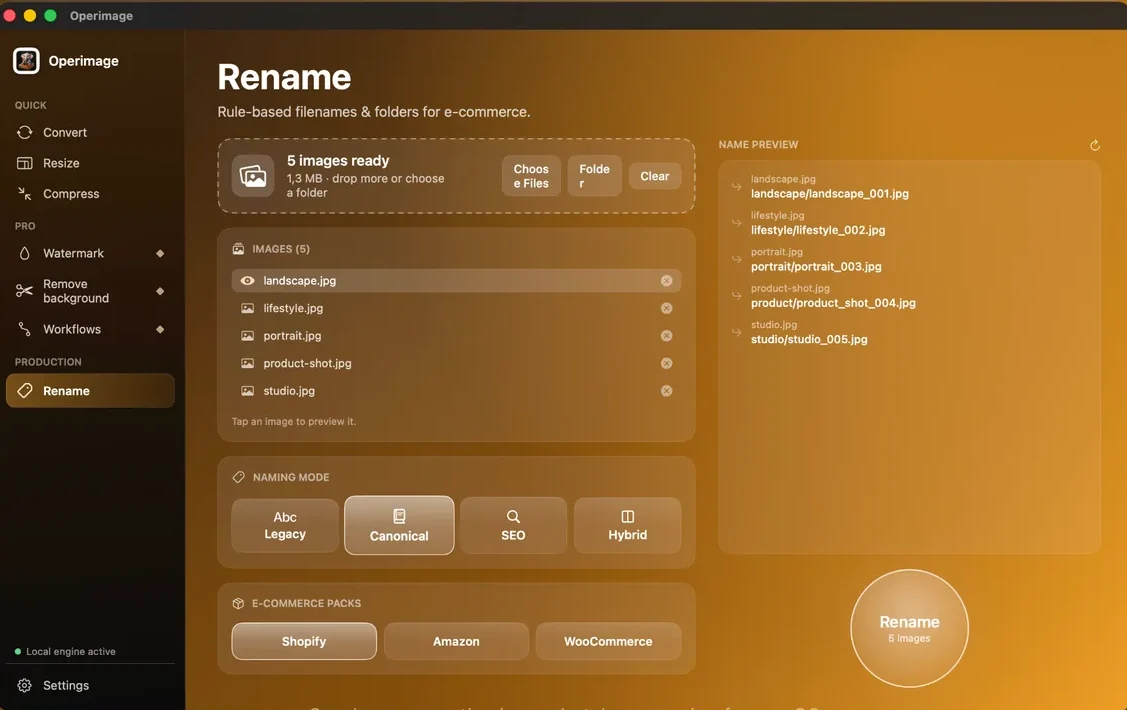
Operimage, a free Mac app, has a dedicated Rename tool with naming modes (Legacy, Canonical, SEO and Hybrid) and e-commerce packs for Shopify, Amazon and WooCommerce. Drop a folder of product photos, choose a pack or mode, adjust counters and tokens, and the live name preview shows exactly what each file will be called before anything is written, for example product-shot.jpg becoming product/product_shot_004.jpg.
Rename can also sort the output into folders, so a flat export can become one folder per product, ready to drag into each product's page. Originals are not overwritten unless you choose to, and Reveal output opens the renamed set in Finder.
Rename as part of the export, not afterward
Renaming after upload prep is where mistakes creep in. Someone converts and resizes a folder, a second person renames it later, and in between the files are copied, mixed with an older export or uploaded under camera names. Making the rename the last step of the same batch closes that gap: files leave the pipeline with their final names.
In Operimage, chain the steps and save them as a Workflow: convert to JPG, resize to the channel's size, compress and strip metadata, then rename. If your source photos arrive in mixed formats, the guide to converting a mixed folder of images at once covers the first step.
- 1Camera filesIMG_4821.HEIC, DSC_0042.JPG
- 2Convert + resizesRGB JPG at channel size
- 3CompressSize budget, metadata stripped
- 4Renametee-crew-navy-front-01.jpg
Folder structure and overwrite safety
A good filename can still end up in the wrong place. Keep a simple, fixed folder layout: masters, untouched, organized by product; and exports, organized by channel, then product. That way an Amazon set with MAIN and PT01 names never gets uploaded to Shopify, and a re-export never replaces the masters.
Write every batch to a new output folder rather than over the source. If a pattern turns out to be wrong, you delete the output and rerun; nothing is lost. It is also a good moment to remove EXIF and GPS data from the exports, because the masters can keep their metadata while public files do not need it.
Naming checklist and common problems
Test the pattern on a real mixed sample, including a product with a long name, one with several colors and one with ten or more photos, before renaming the catalog. These are the problems that sample usually reveals:
- Duplicate names: two variants share a stem. Add the variant marker before the sequence.
- Wrong gallery order: numbers were not zero-padded. Use 01 to 09.
- Amazon images do not attach: the name has dashes or spaces in the identifier, or an unsupported code.
- Names truncated in tools: the pattern is too long. Drop words that do not identify the product.
Before renaming the full catalog
- Pattern written down with one real example
- Lowercase, hyphens, no spaces or symbols
- Fixed vocabulary for variants and views
- Zero-padded sequence numbers
- Amazon set uses identifier.CODE.jpg
- Live preview checked for duplicates
- Output goes to a new folder; masters untouched
Step by step
Write down the fields your filename needs
Decide on the order of product ID or handle, variant, and angle or sequence before renaming anything, and write one example name for a real product.
Drop the export folder into Rename
In Operimage, open Rename and drop the folder of resized, compressed images, or click Folder. The status line shows how many images are ready.
Pick a naming mode or an e-commerce pack
Choose the Shopify, Amazon or WooCommerce pack, or a naming mode such as SEO or Canonical, and set counters and tokens to match your pattern.
Check the live name preview
Read the live preview for several files, including the longest product name and a variant, and look for duplicates or unclear markers.
Rename and reveal the output
Press Rename, optionally sorting files into one folder per product, then click Reveal output to open the renamed files in Finder.
Save the chain as a Workflow
Add the rename step to your resize and compress Workflow so every future product drop gets the same names automatically.
Ways to rename e-commerce image batches on Mac
| Path | Pattern control | Collision safety | Repeatability | Best fit |
|---|---|---|---|---|
| Finder Rename | Name plus counter, find and replace | Warns on conflicts | Manual each time | One product at a time |
| Spreadsheet plus script | High | Depends on the script | Medium | Teams with a developer |
| Operimage Rename | Modes, tokens, Shopify/Amazon/WooCommerce packs | Live preview before writing | Saved Workflows | Repeatable catalog exports |
FAQ
How should I name product images?
Use product ID or handle, then variant, then view or a zero-padded sequence, in lowercase with hyphens, such as tee-crew-navy-front-01.jpg. Apply the same pattern to every product.
Should product image filenames include the SKU?
Yes, if your team or inventory system works by SKU, because SKUs are unique and stable. A hybrid of a short descriptive name plus the SKU works well when the filename also appears in public URLs.
Hyphens or underscores in image filenames?
Use hyphens. Google recommends hyphens to separate words in URLs, and they are safe on every e-commerce platform.
How do I name images for Amazon bulk upload?
Use the product identifier, a period, a variant code and the extension, such as B0XXXXXXXX.MAIN.jpg for the main image and B0XXXXXXXX.PT01.jpg for additional images. Do not add spaces or dashes.
Do image filenames help SEO?
A little. Google uses descriptive filenames as a light hint about image content, while alt text and the surrounding page matter more.
Can I batch rename product photos on a Mac?
Yes. Finder can rename a selection with a name and counter, and a batch app such as Operimage can apply patterns, e-commerce packs and folder sorting to whole catalogs with a live preview.
Why do my renamed files sort in the wrong order?
The sequence numbers were not zero-padded, so 10 sorts before 2 in many tools. Use 01, 02 and so on.