
What size should Etsy listing photos be?
Etsy recommends listing photos that are at least 2000 px on the shortest side, which gives shoppers a sharp zoom on texture and detail. Listing photos are shown at a 4:3 ratio in search results, so a landscape 4:3 image avoids surprise crops. Putting those together, 3000×2250 px is a dependable target: it is 4:3, and its shortest side is comfortably over 2000 px.
Etsy accepts JPG, PNG and GIF files and suggests keeping files modest in size, around 1 MB or less, so pages load quickly. JPG in the sRGB color space is the best choice for product photos. These are the well-established recommendations; Etsy's help center page on listing photos has the current details, including how many photos a listing can hold.
If you also sell on Shopify or Amazon, the guide to optimizing product images for every channel shows how to derive an Etsy set and the other platforms' sets from the same masters.
- Recommended Etsy listing3000 × 2250 · 4:3
- Minimum 4:3 at 2000 px short side2667 × 2000 · 4:3
- Too small for good zoom1200 × 900 · avoid
How the Etsy thumbnail crop works
The first photo in a listing becomes its thumbnail, the image shoppers see in search results, on your shop page and in recommendations. Etsy shows listing photos at 4:3 in search, and some placements can crop tighter than that. When you add or edit a listing, Etsy lets you adjust the thumbnail by dragging the photo inside the crop frame, so you can correct a single listing by hand.
For a whole shop, it is better to frame the lead photo so no adjustment is needed. Place the product in the center, leave margin on every side, and keep important details, such as a pendant on a necklace or the face of a mug, away from the edges. A photo that works when cropped toward a square also works at 4:3.
Consistency matters as much as the crop. Etsy search shows dozens of listings side by side; a shop whose thumbnails share the same background, angle, lighting and scale looks cohesive and recognizable. If listings already look soft, work through the fixes for blurry Etsy photos.
- Center the product: crops trim edges, not the middle.
- Leave about 10–15% margin on each side.
- Keep text and key details out of the outer edges.
- Use the same background and camera angle for every lead photo.
Which photos should an Etsy listing include?
Shoppers cannot pick up a handmade item, so the photo set has to answer the questions they would ask in person: what it looks like, how big it is, what it is made of and how it looks in use. Plan the set before the shoot so every listing follows the same order, which makes the shop feel organized and speeds up editing.
Every photo in the set should use the same 4:3 ratio and export settings as the lead photo, so swiping through the gallery feels smooth rather than jumping between shapes.
- Lead photo: the whole product on a clean, consistent background, centered for the thumbnail.
- Detail close-up: texture, stitching, glaze or grain, cropped from the full-resolution original.
- Scale shot: the item in a hand, on a person or next to a familiar object.
- In-use or lifestyle shot: the product in the setting buyers imagine.
- Variations: each color or size option, shot from the same angle.
- Packaging: how the item arrives, if gift presentation is part of the appeal.
Backgrounds and lighting for a consistent shop
Etsy has no background rule like Amazon's pure white main image, which gives you room to build a recognizable look: a linen backdrop, a wooden surface or a soft neutral color. What matters is using the same one for every lead photo. Soft daylight from a window, with a white card opposite to fill shadows, is enough for most small products.
If older listings were shot on mismatched surfaces, you can cut the products out with an on-device background remover and place them on one shared background, so the whole shop matches without a reshoot.
Etsy photo specs at a glance
The table below collects the numbers that matter when you export Etsy photos. Where Etsy does not publish a fixed number, the value is a practical recommendation and marked as such.
Etsy listing photo reference (confirm on Etsy's help center)
| Setting | Recommendation | Notes |
|---|---|---|
| Shortest side | At least 2000 px | Etsy's recommendation for sharp zoom |
| Ratio in search | 4:3 landscape | Frame the lead photo for this crop |
| Practical export size | 3000 × 2250 px | 4:3 with a 2250 px short side |
| File format | JPG (PNG and GIF accepted) | JPG in sRGB for photos |
| File size | Around 1 MB or less | Smaller files load faster |
| Metadata | Strip EXIF/GPS | Practical privacy recommendation |
How to compress Etsy photos without losing detail
Handmade and vintage items sell on detail: grain, weave, brushstrokes, patina. That makes Etsy photos sensitive to over-compression, which shows up as smearing in fine texture and blocky gradients in soft backgrounds. A JPEG quality of about 75–85% at 3000×2250 px is usually visually identical to the original and lands near or below 1 MB for most product shots.
Rather than checking every file, set a budget and let the encoder find the best quality under it. Compressing to a target file size is ideal for this: a plain white-background photo comes in well under budget at high quality, while a busy lifestyle shot gets the lowest quality that still fits.
Always compress from the original photo, not from a previously exported JPG. Each JPG re-save adds artifacts, and Etsy's zoom shows them.
Color, metadata and iPhone photos
Many Etsy sellers shoot on an iPhone, which saves HEIC files in the Display P3 color space by default. Convert them to sRGB JPG before upload so colors stay true in every browser and in the Etsy app; the guide to turning iPhone HEIC photos into JPG covers a whole folder at once.
Phone photos also carry EXIF metadata, often including GPS coordinates. If you photograph products at home, that location can travel with the file. Stripping EXIF and location data before upload is a simple privacy habit, and it slightly reduces file size.
Should you watermark Etsy photos?
Watermarks are optional on Etsy, and most successful listings use clean photos because a visible mark distracts from the product, especially in the small thumbnail. Copying of images does happen, so some sellers add a small, low-opacity logo to secondary photos while leaving the lead photo clean.
If you go that way, apply the same mark in the same corner across the whole shop rather than placing it by hand. A tool to watermark a folder of photos at once keeps placement, size and opacity identical on every image.
Batch-preparing Etsy photos in Operimage
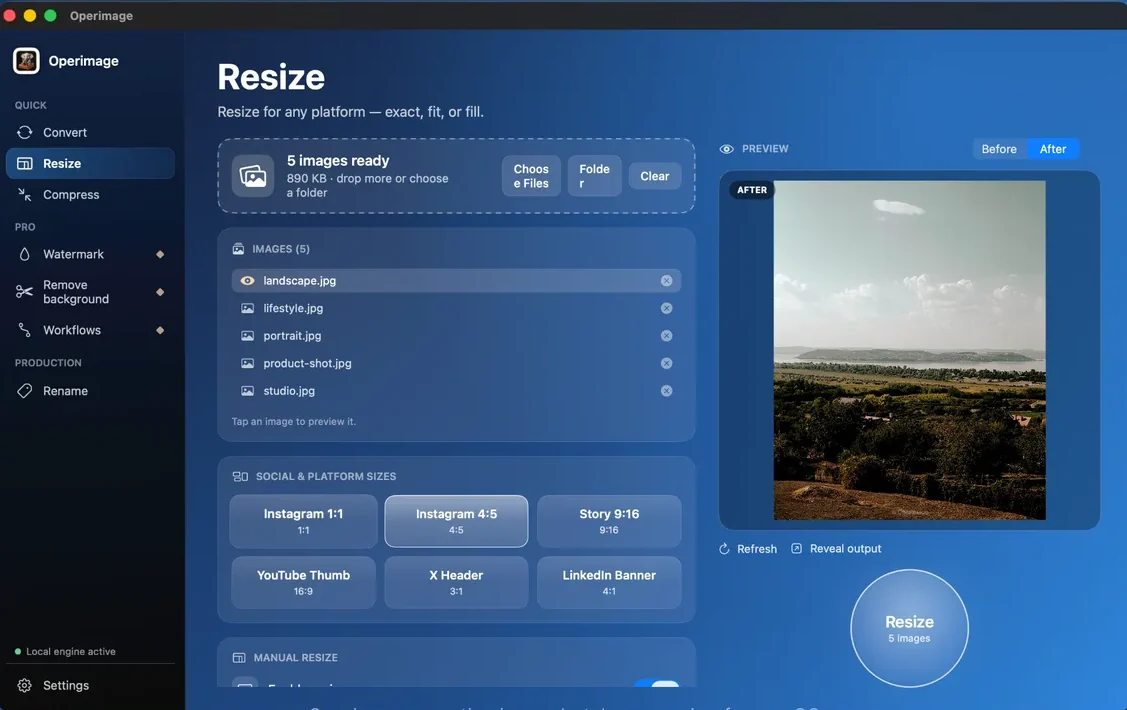
Operimage, a free Mac app, prepares a whole shop's photos on-device. Drop a folder of listing photos onto the Resize tool, open Manual resize, enter 3000 × 2250 and choose fill for an exact 4:3 frame. Click through a few images, including the tallest product, to check the Before/After preview, then press Resize.
Next, in Compress, keep JPEG as the output, set quality near 80% or use Target file size with a budget around 1 MB, and turn on metadata stripping. Finally, rename the files by listing, for example ceramic-mug-sage-01.jpg; the guide to naming product image files has patterns for variants and photo order. Save the three steps as a Workflow so the next batch of listings matches the last.
Can you resize Etsy photos with Preview on Mac?
Yes, for small batches. Open the photos together in Preview, select all thumbnails in the sidebar, choose Tools › Adjust Size and set the width to 3000 px. Preview keeps the original proportions, so iPhone photos, which are already 4:3, come out at 3000×2250, while photos in other ratios keep their shape. Use File › Export to save JPG copies with a quality slider instead of overwriting the originals.
Terminal users can do the same with the built-in sips command: sips -Z 3000 *.jpg --out resized scales each photo so its longest side is 3000 px and writes copies to a folder named resized (create it first with mkdir resized). Without --out, sips changes the original files in place, so keep a backup.
Preview does not compress to a size budget, strip metadata in bulk or rename by pattern, so for regular listing updates a saved batch workflow is quicker. Amazon and Shopify need different crops; see the guide to Amazon listing image rules if you sell there too.
- 1Listing photosiPhone HEIC or camera JPG, one folder per listing
- 2Resize to 4:33000 × 2250, product centered
- 3Compress + stripsRGB JPG, ~1 MB budget, no GPS
Etsy photo checklist and troubleshooting
Before uploading, open a few exported files at full size and check them against this list. Most Etsy photo complaints, such as blurry zoom, cut-off thumbnails or dull color, trace back to one of these points.
- Thumbnail cuts off the product: the item sits near an edge. Re-frame with more margin or reposition the thumbnail in the listing editor.
- Zoom looks soft: the shortest side is under 2000 px, or the photo was upscaled. Re-export from the original.
- Colors look dull or different in the app: the file kept a Display P3 profile. Convert to sRGB.
- Upload is slow or photos load slowly: files are several MB. Compress toward 1 MB.
Before you publish the listing
- Photos are 4:3 with at least 2000 px on the shortest side
- Lead photo is centered with margin and has a clean background
- Files are sRGB JPG, around 1 MB or less
- EXIF/GPS metadata removed
- Thumbnail checked in the listing editor
- Lighting, angle and background match the rest of the shop
Step by step
Group photos by listing
Put each listing's photos in its own folder and drop the parent folder into Operimage. Subfolders are detected and the structure can be kept.
Resize to 3000 × 2250
In Resize, use Manual resize with 3000 × 2250 px (4:3). Choose fill for an exact 4:3 frame and check the Before/After preview on your tallest and widest items.
Compress toward 1 MB
In Compress, keep JPEG output and either set quality around 80% or use Target file size with a budget near 1 MB, and turn on metadata stripping.
Rename by listing and export
In Rename, use a pattern such as product-name-color-01, check the live preview, run it and click Reveal output to open the files in Finder for upload.
Save the steps as a Workflow
Save resize, compress and rename as a Workflow so every new listing is prepared with the same size, crop and file weight.
FAQ
What size should Etsy listing photos be?
Etsy recommends at least 2000 px on the shortest side. A 4:3 image of 3000×2250 px is a dependable target that matches how photos appear in search and allows sharp zoom.
What aspect ratio is best for Etsy photos?
4:3 landscape, because Etsy shows listing photos at 4:3 in search results. Keep the product centered so tighter thumbnail crops do not cut it off.
Why does my Etsy thumbnail look cropped?
Etsy crops the first photo for thumbnails, so anything near the edges can be cut. Center the product with margin, and adjust the thumbnail position when editing the listing.
What file format should I use for Etsy photos?
JPG in the sRGB color space is best for product photos. Etsy also accepts PNG and GIF, but PNG photos are much larger with no visible benefit.
How big should Etsy photo files be?
Aim for around 1 MB or less per photo. A 3000×2250 JPG at about 80% quality usually lands near that while keeping fine detail.
Can I resize all my Etsy photos at once on a Mac?
Yes. Preview can resize a selection of photos together, and a batch app such as Operimage can resize, compress, strip metadata and rename a whole folder in one run.