The fix in short
Blurry Etsy photos almost always come from one of three things: the uploaded image has too few pixels, it was compressed too hard, or the thumbnail crop zooms into a small part of the frame. Start from the original photo, export it at least 2000 px on the shortest side in a 4:3 shape (2667 × 2000 or 3000 × 2250 px), save it as an sRGB JPG at about 85% quality, and keep the file near 1 MB.
If the original itself is soft because of camera shake or missed focus, no export setting will fix it; the photo has to be reshot. Everything else can be fixed on a Mac in minutes, for one listing or the whole shop. Operimage, a free Mac app, resizes and compresses folders of listing photos on your Mac with nothing uploaded.
This guide covers the blur problem specifically. For the full picture of preparing product photos for Etsy, Shopify and Amazon from one set of masters, see the e-commerce image preparation hub for Mac.
- 1Original photoFull resolution from camera or iPhone
- 2Resize to 4:32667 × 2000 or 3000 × 2250 px
- 3CompressJPEG about 85%, near 1 MB
- 4Upload to EtsySharp in search and zoom
Why Etsy photos look blurry
Etsy displays listing photos at many sizes: small in search results, larger on the listing page and full-screen when a shopper zooms. On high-density screens such as a MacBook or a modern phone, each of those placements needs about twice as many pixels as its size in points. A photo that looks fine on your desktop can look soft on a listing when Etsy has to enlarge it.
Like every marketplace, Etsy creates its own resized copies of each upload for the different placements. If the upload is small or already heavily compressed, those copies inherit and amplify the problem. A clean, generous upload gives Etsy's resizing good material to work with.
- Too few pixels: photos under 2000 px on the shortest side get enlarged for zoom and large screens, which looks soft.
- Heavy compression: exporting at low JPEG quality to save space produces smeared texture and blocky gradients that get worse when Etsy creates its copies.
- Second-generation files: photos sent through messaging apps, social networks or email are often resized and recompressed before they reach your Mac.
- Tight thumbnail crop: if the product fills only a small part of the frame and the thumbnail is cropped in, the visible area has few pixels.
- Soft original: camera shake, missed focus or digital zoom on a phone produce blur that resizing cannot remove.
- Screenshots: a screenshot of a photo has only the pixels shown on screen, not the photo's original resolution.
Export blur
Fixable on your Mac
- Too few pixels or heavy compression
- Original looks sharp at 100% on your Mac
- Fix: re-export from the original at 2000 px or more
Capture blur
Needs a reshoot
- Original looks soft at 100% on your Mac
- Camera shake, missed focus or digital zoom
- Fix: tripod, more light, tap to focus, no zoom
Verdict: Open the original at 100% first; it tells you which fix you need.
What size should Etsy photos be to stay sharp?
Etsy recommends listing photos at least 2000 px on the shortest side, which gives shoppers a sharp zoom. Etsy also says the first photo should be at least 635 px wide and tall to avoid appearing lower in search, but that is a minimum for search, not a quality target. Listing photos are shown at 4:3 in search results, so a 4:3 landscape image avoids surprise crops.
Those two facts point to a size range. 2667 × 2000 px is the smallest 4:3 image that meets the 2000 px recommendation, and 3000 × 2250 px gives a little more room for zoom and crops. Larger exports rarely look sharper on Etsy and make it harder to keep files near 1 MB. The guide to Etsy listing photo sizes and the 4:3 crop covers thumbnails, photo order and backgrounds in more depth.
- Minimum sharp 4:32667 × 2000 · 4:3
- Comfortable 4:33000 × 2250 · 4:3
- Square alternative2000 × 2000 · 1:1
Does Etsy compress photos, and how big should the file be?
Etsy's Help Center notes that images larger than 1 MB may not finish uploading, especially on a slower internet connection. That is guidance about upload reliability, not a reason to crush photos into a few hundred KB. The goal is the highest quality that lands near 1 MB.
At 2667 × 2000 px, a JPG at 80–90% quality typically lands somewhere between a few hundred KB and about 1 MB, depending on detail and noise. A plain white-background mug compresses much smaller than a close-up of knitted wool. Instead of guessing a quality level per photo, a target-size compressor finds the best quality under a budget such as 900 KB for each image; the guide to compressing images to an exact file size explains how that works.
Avoid compressing the same photo twice. Each JPEG save discards a little more detail, so export once from the original at the final size and quality instead of re-saving an already compressed JPG.
Etsy export settings that stay sharp (confirm current limits on Etsy's help page)
| Setting | Recommendation | Why |
|---|---|---|
| Shortest side | 2000 px or more | Etsy's recommendation for sharp zoom |
| Shape | 4:3 landscape | Matches the search thumbnail |
| Export size | 2667 × 2000 or 3000 × 2250 px | Meets 2000 px without huge files |
| Format | JPG in sRGB | Consistent color in every browser |
| Quality | About 80–90% | Sharp texture, no blocking |
| File size | Near 1 MB | Larger files may not finish uploading |
How to batch export sharp Etsy photos with Operimage
Fixing blur across a shop means re-exporting dozens or hundreds of photos with the same settings. Operimage does that on your Mac in one pass, writes new files and leaves the originals untouched.
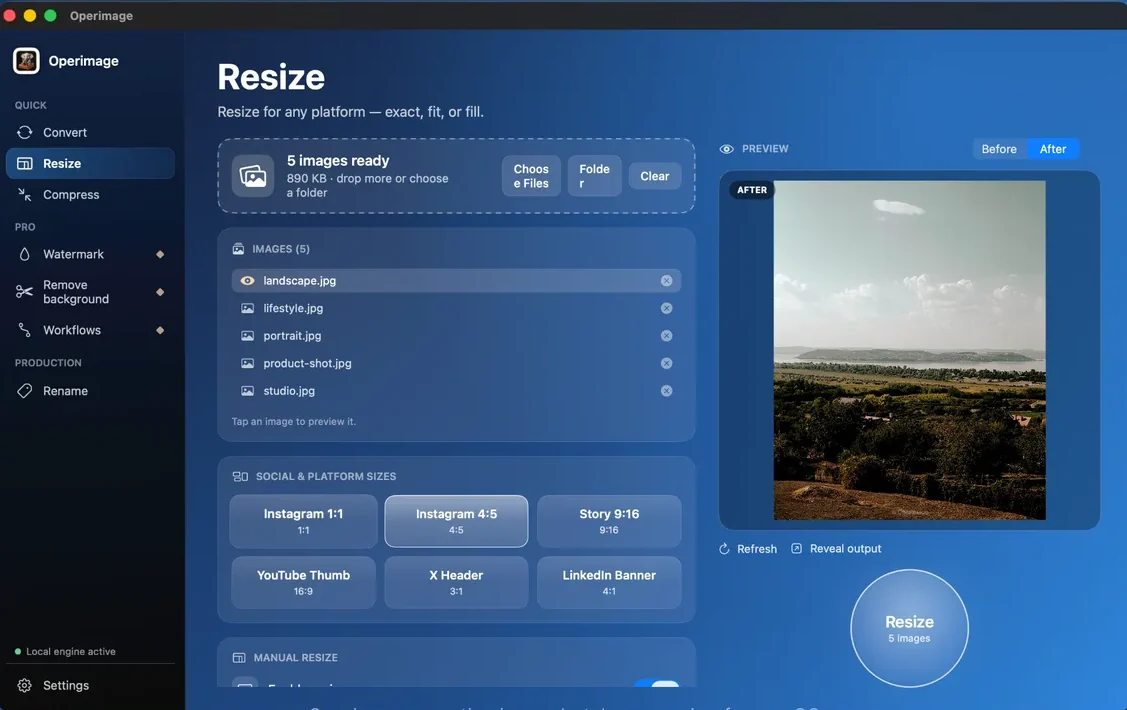
Open Resize and drop the full-resolution originals onto the window. Choose Manual resize, enter 2667 × 2000 or 3000 × 2250, and choose fill to crop to 4:3. Click a photo to check the framing in the Before/After preview, then press Resize. The bulk resizing guide for Mac explains fit versus fill if some products need padding instead of a crop.
Next, open Compress with the resized photos. Choose JPEG output and set Target file size to about 900 KB, or set the quality slider to around 85%. Click the most detailed photo and compare Before and After to confirm texture is intact. Turn on metadata stripping, press Compress and click Reveal output. Save resize → compress as a Workflow so every new listing gets the same treatment.
Can you fix a small or blurry photo by enlarging it?
No. Enlarging a 1000 px photo to 2000 px gives Etsy more pixels but not more detail; the result looks just as soft, only bigger. Operimage and the built-in macOS tools resize and compress, and none of them invent detail that the original never captured.
If the only copy you have is small, look for the original first: the iPhone or camera itself, iCloud Photos, or the full-size export from your editing app. Photos that arrived through a messaging app or were downloaded from social media are usually reduced copies. If no larger original exists, reshoot the product.
Shooting photos that stay sharp
Export settings can only preserve the sharpness that the photo has. A few habits at capture time make the biggest difference for small handmade products.
- Light: shoot near a large window in soft daylight; more light means a faster shutter and less shake.
- Stability: use a tripod or rest the phone on a stack of books, and use the self-timer so tapping the shutter does not move the camera.
- Focus: tap the product on the iPhone screen to set focus, and check the result at 100% on your Mac before packing up.
- No digital zoom: move closer instead of zooming; digital zoom crops the sensor and loses detail.
- Fill the frame: compose so the product takes up most of the frame with some margin, so crops do not enlarge a small area.
- Clean background: busy or mismatched backgrounds make soft edges more noticeable; an offline background remover for Mac can place older shots on one consistent backdrop.
iPhone photos, color and other causes of soft-looking images
Some photos are sharp but look dull or soft for other reasons. These are worth checking before you reshoot anything.
A quick test separates the causes: open the uploaded listing on your phone and on your Mac, zoom into the same detail, and compare it with the original at 100% in Preview. If the original is crisp and the listing is soft, the export is the problem. If both are soft, the capture is. If only the thumbnail is soft, the crop is too tight.
- HEIC originals: convert iPhone HEIC photos to JPG as part of your export, starting from the full-size original, so every tool in your pipeline handles the file the same way.
- Display P3 color: iPhone photos use a wide color space; exporting to sRGB keeps colors and contrast consistent in browsers, which helps photos look crisp.
- Edited in the browser: cropping or rotating heavily inside an upload form can resample the image; crop on your Mac first.
- Watermarks: large, semi-transparent text across the product distracts from detail; keep any watermark small and in a corner.
- Over-sharpening: heavy sharpening in an editing app creates halos around edges, which look harsh at thumbnail size and can make texture look noisier rather than crisper.
Checklist for sharp Etsy listing photos
Use this list before uploading a new listing or refreshing old ones. It catches every common cause of blur described above.
Before you upload to Etsy
- Original photo is sharp at 100% on your Mac
- Exported from the original, not from a shared or downloaded copy
- 4:3 with the shortest side 2000 px or more
- JPG in sRGB at about 80–90% quality
- File near 1 MB
- Product centered with margin for the thumbnail crop
- Metadata and GPS stripped
Step by step
Load the original photos into Resize
In Operimage, choose Resize and drop the full-resolution originals onto the window, not copies that were already shrunk or sent through a messaging app.
Set 2667 × 2000 or 3000 × 2250
Under Manual resize, enter a 4:3 size with a short side of at least 2000 px and choose fill to crop to 4:3. Press Resize.
Compress to about 1 MB
Open Compress with the resized photos, choose JPEG output and set Target file size to about 900 KB, or quality to around 85%.
Check detail in Before/After
Click the most detailed photo in the list and compare Before and After at full size. If texture smears, raise the budget or use the smaller 4:3 size.
Strip metadata and upload
Turn on metadata stripping, press Compress, click Reveal output and upload the new files to your Etsy listing. Save the steps as a Workflow.
FAQ
Why are my Etsy photos blurry?
The upload usually has too few pixels, was compressed too hard, or is cropped tightly for the thumbnail. Upload 4:3 photos at least 2000 px on the shortest side, saved as JPG at about 85% quality.
What resolution should Etsy photos be?
Etsy recommends at least 2000 px on the shortest side. A 4:3 export of 2667 × 2000 or 3000 × 2250 px works well for search thumbnails and zoom.
Does Etsy compress uploaded photos?
Etsy creates resized copies of each upload for different placements, as every marketplace does. Starting from a large, lightly compressed JPG keeps those copies sharp.
What is the maximum file size for Etsy photos?
Etsy's Help Center says images larger than 1 MB may not finish uploading, especially on slow connections. Aim for files near 1 MB and check Etsy's help page for current guidance.
Why is my Etsy thumbnail blurry but the listing photo is fine?
The thumbnail crop may be zooming into a small part of the photo. Frame the product larger in the shot, leave even margins and adjust the thumbnail crop when editing the listing.
Can I make a low-resolution photo sharp for Etsy?
Enlarging a small photo adds pixels but not detail, so it still looks soft. Find the original full-size file or reshoot the product.