eBay photo requirements in short
eBay requires every listing to have at least one photo that is at least 500 px on its longest side. Photos must accurately show the item, and eBay's picture policy prohibits added borders, added text or marketing artwork, watermarks of any type, and placeholder images. Used, damaged or defective items must be shown with real photos of the item, not catalog or stock photos.
Beyond the minimum, eBay recommends photos of about 1600 px on the longest side, accepts files up to 12 MB, and lets you add up to 24 photos to a listing. These rules come from eBay's picture policy and its help page on adding pictures to listings; check both before a large upload, because eBay updates them from time to time.
eBay is one marketplace among several. If you also sell on Amazon, Etsy or your own store, the e-commerce image optimization guide for Mac shows how one master set of photos feeds every channel.
- 500 pxMinimum on the longest side
- 1600 pxRecommended longest side
- 12 MBMaximum per photo
- 24Photos per listing
What size should eBay photos be?
The minimum is 500 px on the longest side, but that is a floor, not a target. eBay recommends about 1600 px on the longest side, which gives buyers a sharp zoom on the listing page without making files heavy. A 1600 × 1600 px square is the practical default: it meets the recommendation, fills the square gallery thumbnail in search results, and uploads quickly.
eBay's help page notes that square (1:1) photos generally look best, with 16:9 also working. Tall portrait photos leave empty space beside the item in search results. If your camera shoots 4:3 or 3:2, crop to a square around the item, leaving a little background on every side so nothing is cut off.
Do not upscale small photos to reach 1600 px. Enlarging a 600 px image only makes a blurry 1600 px image, and zoom exposes it. Shoot again or resize from the original full-resolution file.
eBay photo specs (confirm on eBay's help pages)
| Setting | Value | Notes |
|---|---|---|
| Minimum size | 500 px on the longest side | At least one photo must meet it |
| Recommended size | About 1600 px on the longest side | Enough for sharp zoom |
| Best shape | Square (1:1) | Fills the gallery thumbnail |
| Maximum file size | 12 MB per photo | Some older eBay pages say 7 MB |
| Photos per listing | Up to 24 | Use them for angles, details and flaws |
| Safe format | JPEG, sRGB | eBay also accepts PNG and other common formats |
What is not allowed in eBay photos?
eBay's picture policy lists what listing photos cannot include. The rules exist so buyers see the actual item, not marketing material, and so photos look consistent across search results.
- Added borders: frames or colored edges added around the photo are not allowed. A border that is a natural part of the scene, such as a neutral backdrop around a square item, is fine.
- Added text or artwork: no prices, slogans, shipping offers, logos or marketing graphics placed on top of the photo.
- Watermarks: watermarks of any type are prohibited, including a store name or username.
- Stock photos for used items: if an item is used, damaged or defective, you must show the actual item. Catalog images are allowed for new items, and eBay's photo tips note exceptions in categories such as books, movies, music and video games.
- Placeholder images: images like coming soon or no photo available are not accepted.
- Inaccurate photos: the photo must show the item being sold, in its actual condition.
Allowed
Good listing photos
- Real photos of the actual item
- Plain, uncluttered background
- Close-ups of labels, details and flaws
- Catalog photos for new items
Not allowed
Picture policy
- Added borders or frames
- Text, prices, logos or marketing artwork
- Watermarks of any type
- Stock photos for used or damaged items
Verdict: If you would not see it when looking at the item on a table, it should not be in the photo.
Which file formats does eBay accept?
eBay accepts the common image formats, including JPEG, PNG, GIF, TIFF and BMP, and newer eBay pages also list WebP and HEIC. JPEG is still the safest choice: it uploads from every browser and app, keeps files small at high quality, and displays consistently. A 1600 × 1600 px JPEG at about 85% quality is usually well under 1 MB, far below the 12 MB limit.
Photos straight from an iPhone are often HEIC. Even where eBay accepts HEIC, converting to JPEG avoids problems with older browsers, listing tools and bulk uploaders; the guide to batch converting HEIC to JPG covers it. Export in sRGB, because wide-gamut Display P3 photos can look duller once a site strips or ignores the profile.
Phone photos also carry EXIF metadata, including the GPS location where they were taken. If you photograph items at home, remove location data from photos before uploading.
How many photos should an eBay listing have?
eBay lets you add up to 24 photos to a listing. You do not need all 24, but more photos answer buyers' questions before they ask them, and for used items they are the best protection against not-as-described returns.
A practical sequence for most items: the main photo of the whole item, front and back, each side, the label or model number, close-ups of materials and key features, any flaws or wear, the item in use or with something for scale, and finally accessories or packaging. Keep the main photo the cleanest: the whole item, centered, on a plain background, filling most of the frame.
Do eBay photos need a white background?
No. Unlike Amazon's main-image rule, eBay does not require a pure white background. eBay's photo tips recommend a plain, uncluttered background so the item stands out, and white or light gray is the most common choice because it makes listings look clean in search. If your items are photographed on a busy table, an on-device background remover can cut them out so you can place them on a plain backdrop.
Keep the background natural. Removing a distracting background is fine; editing out damage or changing the item's color is not, because the photo must show the item accurately. Shadows under the item are also fine and often make it look more real.
How eBay compares with Amazon, Etsy and Shopify
If you list the same products on several marketplaces, a single high-resolution master covers most of them, with a few platform-specific crops. Amazon is stricter about the main image, which must be on pure white with the product filling about 85% of the frame; see the Amazon listing image rules. Etsy's listing thumbnails favor a 4:3 crop, covered in the Etsy listing photo guide. Shopify themes usually look best with square images of consistent size, explained in the Shopify product image sizing guide.
Marketplace photo basics compared
| Marketplace | Key size | Background | Text or watermark |
|---|---|---|---|
| eBay | 500 px min, about 1600 px recommended | Plain recommended, not required | Not allowed |
| Amazon | 1000 px+ for zoom | Pure white for main image | Not on main image |
| Etsy | 2000 px+ shortest side, 4:3 in search | Free choice | Optional, usually avoided |
| Shopify | 2048 × 2048 px square recommended | Free choice | Your decision |
Can you prepare eBay photos with built-in Mac tools?
For a few items, yes. Preview crops to a square with the selection tool, Tools › Adjust Size sets 1600 px, and File › Export saves JPEG with a quality slider. Photos on the Mac can export a selection as JPEG at full size. In Terminal, sips -Z 1600 *.jpg scales every image so the longest side is 1600 px, but it overwrites the files unless you pass --out with another folder.
These tools slow down when you have dozens of items with several photos each: HEIC conversion, square crops, compression, metadata removal and file naming are separate steps in separate places. A batch app that runs all of them in one pass, with a preview, saves most of that time.
A batch workflow for eBay photos on Mac
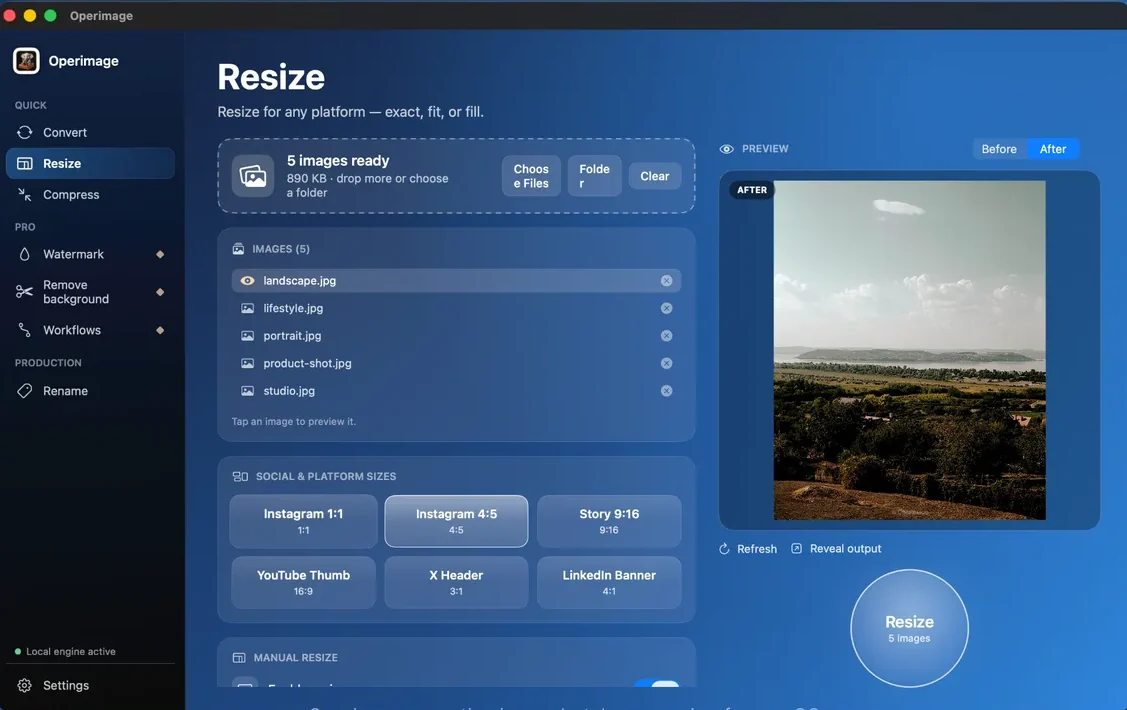
Operimage, a free Mac app, handles the whole preparation on-device; nothing is uploaded and the originals are kept unless you choose to overwrite them. Save the chain as a Workflow and run it every time you photograph a new batch of items.
- Convert: HEIC to JPEG at about 85% quality.
- Resize: Manual resize to 1600 × 1600 with fill for square gallery photos, or fit for the original shape.
- Compress: high-quality JPEG, metadata stripping on; Target file size if you want every file under a set budget.
- Rename: SEO mode with item names and a counter, so files read like vintage-leather-bag-01.jpg instead of IMG_4821.jpg.
- Watermark: leave it off for eBay; the picture policy does not allow watermarks.
- Folders: keep the source structure so each item's photos stay in their own folder.
eBay photo checklist before listing
Run through this list for the main photo of every item and a sample of the rest. It catches the issues that lead to rejected uploads, removed listings or returns.
Before you list on eBay
- Every listing has a photo of at least 500 px, ideally 1600 px, on the longest side
- Main photo shows the whole item, centered, on a plain background
- No added borders, text, logos or watermarks
- Used items shown with real photos, including any flaws
- Files are sRGB JPEG and well under 12 MB
- GPS and other EXIF metadata removed
Troubleshooting eBay photo problems
If a photo will not upload or looks wrong on the listing, the cause is usually one of these.
- Upload says the photo is too small: the longest side is under 500 px. Use the original file, not a screenshot or a messaging-app copy.
- Upload fails or times out: the file is over the size limit or in a format the uploader does not handle well. Export JPEG under 7 MB.
- Photo looks blurry when zoomed: it was resized from a small original or compressed too hard. Re-export from the original at 1600 px and about 85% quality.
- Gallery thumbnail is cropped or shows the item small: the photo is very tall or the item fills little of the frame. Crop square and tighter around the item.
- Listing flagged for photo issues: check for borders, text overlays or a watermark added by an editing app.
Step by step
Put each item's photos in its own folder
Group photos by item or SKU, then drop the parent folder into Operimage. Subfolders are kept, so each item's photos stay together in the output.
Convert iPhone HEIC photos to JPEG
In Convert, choose JPEG at around 85% quality so every photo uploads the same way from any browser.
Resize to 1600 px
In Resize, use Manual resize with 1600 × 1600 and fill for a square gallery photo, or fit to keep the original shape with the longest side at 1600 px.
Compress and strip metadata
In Compress, keep JPEG at a high quality, optionally set a Target file size of a few megabytes, and turn on metadata stripping to remove GPS location.
Rename and export
In Rename, use the SEO naming mode with item names and a counter, check the live preview, run it, and click Reveal output to open the files in Finder.
FAQ
What size should photos be for eBay?
At least one photo must be 500 pixels or more on the longest side. eBay recommends about 1600 pixels on the longest side for sharp zoom, and a 1600 × 1600 square fits the gallery best.
How many photos can I add to an eBay listing?
You can add up to 24 photos per listing. Use them for every angle, labels, details and any flaws.
What is the maximum file size for eBay photos?
eBay's help page gives 12 MB per photo, though some older eBay pages say 7 MB. A 1600 pixel JPEG is usually under 1 MB, so the limit rarely matters.
Can I put a watermark on my eBay photos?
No. eBay's picture policy prohibits watermarks of any type, as well as added borders, text and marketing artwork.
Can I use stock photos on eBay?
Only for new items. Used, damaged or defective items must be shown with real photos of the actual item, with some exceptions in media categories such as books and music.
Does eBay require a white background?
No. eBay recommends a plain, uncluttered background so the item stands out, but white is not required. White or light gray are popular because they look clean in search.
What file format is best for eBay photos?
JPEG in the sRGB color space. eBay accepts other common formats, but JPEG uploads reliably everywhere and keeps files small at high quality.