Facebook image sizes at a glance
Facebook's main image sizes in 2026 are an 851 × 315 px Page cover, a profile picture of at least 320 × 320 px, 1080 × 1350 px (4:5) or 1080 × 1080 px (1:1) feed images, 1080 × 1920 px Stories, and 1200 × 630 px link previews. The cover and profile numbers come from Facebook's help center, the Stories and feed shapes from Meta's ads guide, and the link preview size from Meta's developer documentation for webmasters.
For the same visual across several networks, the all-platform social media image size guide puts Facebook next to Instagram, X, LinkedIn and others. The table below is the Facebook-only reference.
Facebook image sizes (October 2026)
| Placement | Recommended pixels | Ratio | Notes |
|---|---|---|---|
| Page cover photo | 851 × 315 | About 2.7:1 | Fastest as sRGB JPG under 100 KB; minimum 400 × 150 |
| Personal profile cover | At least 720 wide | Similar to Page cover | Crop in Facebook after upload |
| Profile picture | 320 × 320 or larger | 1:1 | Shown as a circle, 176 px desktop, 196 px phone |
| Feed post, portrait | 1080 × 1350 | 4:5 | Meta's ad guide recommends 1440 × 1800 |
| Feed post, square | 1080 × 1080 | 1:1 | Safe for carousels and multi-photo posts |
| Stories | 1080 × 1920 | 9:16 | Keep about 250 px at top and bottom clear |
| Link preview (og:image) | 1200 × 630 | 1.91:1 | Minimum 600 × 315 for the large preview, under 8 MB |
The main Facebook sizes drawn to scale
Seen together, Facebook's placements fall into three families: wide banners (cover and link preview), squares and near-squares (profile picture and feed), and tall full-screen frames (Stories). One master photo can feed all three, but each needs its own crop. Plan shoots with extra space around the subject so the wide and the tall crops both have something to work with.
- Page cover851 × 315 · fastest load
- Link preview1200 × 630 · 1.91:1
- Feed portrait1080 × 1350 · 4:5
- Stories1080 × 1920 · 9:16
- Profile picture320 × 320 · circle
What size is a Facebook cover photo?
Facebook's help center says a Page cover photo loads fastest as an sRGB JPG that is 851 px wide, 315 px tall and under 100 KB. The minimum is 400 × 150 px. For a personal profile, the cover must be at least 720 px wide, and you position it after upload.
The cover is not shown at one fixed shape. Computers display it wider and phones display it closer to a shorter, more square crop, so the left and right edges of an 851 × 315 image can be cut on mobile. Put names, dates and logos in the center third and treat the sides as background. The profile picture also overlaps the cover on some layouts, which is another reason to keep the lower-left clear.
For covers with a logo or text, Facebook notes that a PNG file can give a better result, because JPEG compression softens edges around lettering. That conflicts with the 100 KB JPG advice, so choose by content: photo covers as JPEG under 100 KB, text-heavy covers as PNG. A 100 KB budget is tight for a detailed photo; the guide to compressing an image to a target size shows how to hit it without guesswork.
- Photo cover: 851 × 315 px, sRGB JPEG, under 100 KB.
- Text or logo cover: 851 × 315 px PNG, checked on a phone for edge crops.
- Sharper on Retina screens: some designers export at double size (1702 × 630 px) and accept a larger file; Facebook's own advice is the 851 × 315 size.
What size should a Facebook profile picture be?
Facebook's help center says a Page profile picture displays at 176 × 176 px on computers and 196 × 196 px on smartphones, and should be at least 320 × 320 px for best quality. The picture is cropped to a circle, so center the face or logo and leave a margin so nothing touches the edge.
Upload a square image larger than the display size, such as 720 × 720 px, so it stays sharp on high-density screens. For logos, PNG keeps edges clean; avoid transparency, because a transparent logo can sit on a background color you did not choose. Profile pictures also appear at tiny sizes in comments, so test that the logo is still readable at about 40 px.
What is the best image size for Facebook posts?
Facebook does not publish a single size for regular photo posts, but Meta's ads guide gives the clearest signal: for Facebook Feed image ads, it recommends a 4:5 ratio at 1440 × 1800 px, accepts JPG or PNG, and sets a minimum width of 600 px. 1:1 is also supported. For organic posts, 1080 × 1350 px (4:5) and 1080 × 1080 px (1:1) are the common exports and match what you may already make for Instagram.
Portrait 4:5 takes the most vertical space in the mobile feed, which helps a photo stand out while scrolling. Landscape images work, but appear smaller. With several photos in one post, Facebook arranges them in a collage and crops each tile, so keep subjects central or post them as a carousel of squares. If you already prepare Instagram images, the Instagram batch resizing guide produces 4:5 and 1:1 files that work on Facebook too.
4:5 portrait
1080 × 1350
- Most screen space in the mobile feed
- Meta's recommended shape for feed image ads
- Best for people, products and phone photos
1:1 square
1080 × 1080
- Crops predictably in collages and carousels
- Reusable on most other networks
- Safer when one image must work everywhere
Verdict: Use 4:5 for single standout posts and 1:1 for carousels and multi-photo posts.
Facebook Stories size and safe zones
Facebook Stories are full-screen 9:16 frames; export them at 1080 × 1920 px. Meta's guidance for Stories and Reels ads is to keep roughly 14% of the top and bottom, about 250 px each on a 1920 px tall image, free of text and logos so the profile name, reply bar and call-to-action button do not cover them. The same margin is good practice for organic Stories.
Meta's ads guide lists JPG and PNG for Stories images. A horizontal photo posted to Stories is shown with bands or a blurred background, so crop deliberately to 9:16 if the Story is the main placement.
Event covers and ad images
Facebook's help page for event cover photos does not state an exact size. 1920 × 1005 px (1.91:1) is widely used by designers and matches the link-preview shape, but confirm the crop in the event preview before publishing.
Ads follow Meta's ads guide rather than the profile rules. As of October 2026, the guide recommends 4:5 for feed image ads, 9:16 for Stories, and 1:1 for carousels, with JPG or PNG files. Meta updates these recommendations regularly, so check the ads guide for your objective and placement before a campaign.
How to plan one photo for every Facebook placement
Most Pages publish the same campaign image as a cover, a feed post, a Story and a link preview. Instead of designing four files from scratch, shoot or design one master with generous space around the subject, then crop it four ways. A 3000 px wide master with the subject in the middle third gives enough room for a 2.7:1 cover, a 4:5 feed crop, a 9:16 Story and a 1.91:1 link image without upscaling.
Keep a fixed order of operations: crop to the placement's ratio first, resize to the target pixels second, and compress last. Compressing before cropping wastes quality, and resizing before cropping can leave the subject too small. Name each export by placement, such as spring-sale-cover.jpg and spring-sale-story.jpg, so the right file goes to the right slot when you schedule posts.
- Cover crop: subject in the center third, text large enough to read on a phone.
- Feed crop: 4:5, subject slightly above center, where the eye lands while scrolling.
- Story crop: 9:16, nothing important in the top or bottom 250 px.
- Link crop: 1.91:1, no small text near the edges.
Why does Facebook make my photos blurry?
Facebook re-compresses every upload. Photos that are much larger than needed, very heavy, or saved in a wide-gamut color profile are the ones that change most. Uploading at the displayed size, as an sRGB JPEG at a sensible quality, keeps that second compression gentle. A 1080 × 1350 px JPEG at about 85% quality is usually a few hundred kilobytes and holds up well.
Text-heavy graphics are the exception: JPEG artifacts gather around letters. Export those as PNG at the exact size; if you have a folder of screenshots in PNG and need lighter files for photo posts, convert PNG to JPG on Mac for the photographic ones only. Also check the Facebook app's media upload setting on your phone, which controls whether photos are uploaded in higher quality.
Before you upload to Facebook
- Cover is 851 × 315 px with text in the center third
- Profile picture is at least 320 × 320 px and reads as a circle
- Feed images are 4:5 or 1:1 at 1080 px wide
- Stories are 1080 × 1920 px with 250 px clear at top and bottom
- Files are sRGB, JPEG for photos and PNG for text-heavy graphics
- Location metadata removed from phone photos
How to resize a folder of images for Facebook on Mac
macOS can handle a few images: Preview crops with the selection tool and sets pixels in Tools › Adjust Size, and sips in Terminal scales a folder (sips -Z 1080 *.jpg resizes the longest side to 1080 px, overwriting the files unless you use --out). Neither crops a mixed folder to a fixed ratio with a preview first.
Operimage, a free Mac app, does that on-device. In Resize, the Instagram 4:5, Instagram 1:1 and Story 9:16 presets produce shapes Facebook uses, and Manual resize sets exact sizes such as 851 × 315 for covers or 1200 × 630 for link images, with fit or fill. Compress then brings each file to a quality or a target size, and can strip metadata. The steps are covered below; for very large folders, the guide to bulk resizing on Mac explains fit, fill and folder structure.
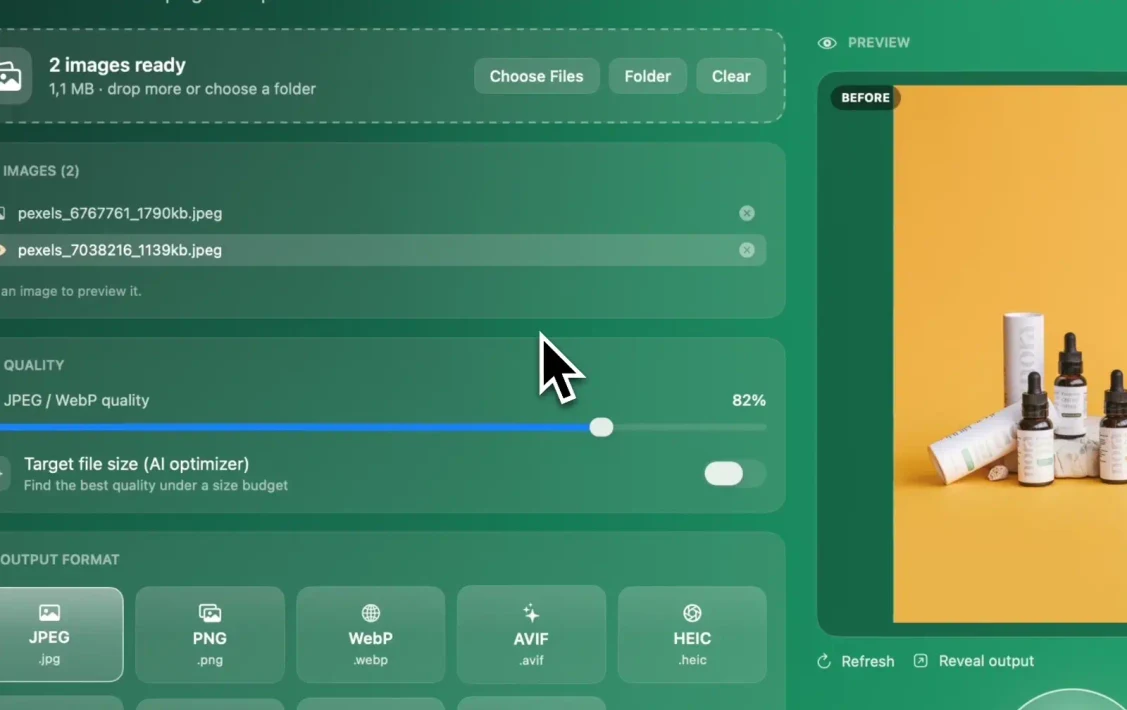
Step by step
Drop the images into Resize
Open Operimage, choose Resize in the sidebar, and drop your files or choose a folder. Click one image in the list to preview it.
Set the Facebook size
For feed posts choose the Instagram 4:5 preset (the same 4:5 shape) or Manual resize to 1080 × 1350; for covers use Manual resize at 851 × 315 with fill; for Stories use the Story 9:16 preset.
Check the crop
Compare Before and After on a few images to make sure faces, products and text stay inside the frame and away from the edges.
Compress to the right weight
In Compress, choose JPEG around 82–85% for photos. For a cover, use Target file size with a 100 KB budget, and turn on metadata stripping.
Save as a Workflow and export
Save the steps as a Workflow for next time, run the batch, and click Reveal output to open the finished files in Finder.
FAQ
What size is a Facebook cover photo in 2026?
Facebook says a Page cover loads fastest as an sRGB JPG that is 851 × 315 pixels and under 100 KB. The minimum is 400 × 150 pixels, and personal profile covers need to be at least 720 pixels wide.
What size should a Facebook profile picture be?
At least 320 × 320 pixels. It displays as a circle at 176 × 176 pixels on computers and 196 × 196 pixels on phones, so keep the subject centered.
What is the best size for a Facebook post image?
1080 × 1350 pixels (4:5) takes the most space in the feed, and 1080 × 1080 pixels (1:1) is the safe fallback. Meta's ad guide recommends 1440 × 1800 pixels for 4:5 feed image ads.
What size are Facebook Stories?
1080 × 1920 pixels in a 9:16 ratio. Keep roughly the top and bottom 250 pixels free of text and logos so interface elements do not cover them.
What image size does Facebook use for link previews?
At least 1200 × 630 pixels at a 1.91:1 ratio for the best display. Images smaller than 600 × 315 pixels appear as a small thumbnail, and files must be under 8 MB.
Why is my Facebook cover photo cropped on mobile?
Facebook shows the cover at a different shape on phones than on computers, so the sides of a wide cover can be trimmed. Keep text and logos in the center third of the image.
Should I upload PNG or JPG to Facebook?
Use JPEG for photos because the files are smaller. Use PNG for logos, text and graphics, which keeps edges crisp after Facebook recompresses the image.