TikTok image size in 2026 at a glance
The recommended TikTok image size is 1080 × 1920 pixels with a 9:16 aspect ratio. That is the exact shape of a modern phone screen, so a photo at this size fills the whole view in a TikTok photo post, the same way a vertical video does. Images in other shapes still upload, but TikTok shows them smaller with empty space above and below or at the sides.
TikTok lets you add up to 35 photos to one post, and viewers swipe through them. The developer documentation for TikTok's photo posting API lists JPEG and WebP as accepted formats, with images up to 1080p and 20 MB each, which is a useful ceiling for uploads from any tool. For how TikTok compares with Instagram, Pinterest, LinkedIn and other networks, see the social media image size cheat sheet.
TikTok image sizes
| Use | Size (px) | Ratio | Notes |
|---|---|---|---|
| Full-screen photo post slide | 1080 × 1920 | 9:16 | Recommended; fills the screen |
| Portrait photo slide | 1080 × 1350 | 4:5 | Popular with creators; shows with space above and below |
| Square photo slide | 1080 × 1080 | 1:1 | Shows as a smaller centered image |
| Profile photo | Square, 400 × 400 or larger | 1:1 | Displayed as a circle; TikTok's minimum is 20 × 20 |
| Photo post limits | Up to 35 photos | Any | JPEG or WebP, up to 20 MB each via the API |
- Full-screen slide1080 × 1920 · 9:16
- Portrait slide1080 × 1350 · 4:5
- Square slide1080 × 1080 · 1:1
- Landscape photo1920 × 1080 · 16:9
How TikTok displays photo posts
A TikTok photo post plays in the same vertical feed as videos. Viewers swipe left and right to move between slides, and the post can carry a sound like any video. Because the feed is full-screen, the frame you are designing for is the whole phone display, not a card inside a feed as on Instagram or LinkedIn.
When a slide is not 9:16, TikTok scales it to fit the width of the screen and fills the remaining space. A 4:5 slide shows with bands above and below; a 16:9 landscape photo becomes a thin strip across the middle of the screen. That is why landscape photos look small on TikTok even when they are high resolution.
TikTok's editor lets you crop or reposition a photo while posting, but doing that on a phone for 20 slides is slow and inconsistent. Preparing the files at 1080 × 1920 beforehand means every slide is framed the way you planned, and TikTok has nothing to crop.
- 9:16 at 1080 × 1920: fills the screen; best for photo dumps, tutorials and product sequences.
- 4:5 at 1080 × 1350: matches an Instagram portrait post, so one export can serve both apps if you accept the bands.
- 1:1 at 1080 × 1080: fine for reposting square graphics; small on screen.
- 16:9 landscape: the smallest on screen; crop to 9:16 or 4:5 if the subject allows it.
9:16 or 4:5 for TikTok carousels?
Use 9:16 when TikTok is the main destination. It is the only shape that uses the whole screen, and text and faces can be larger. Many creators instead post 4:5 slides at 1080 × 1350 because the same files can go straight to an Instagram carousel. That trade-off is legitimate: you save a second export, but each slide uses less of the TikTok screen.
Whichever you choose, keep every slide in a post the same ratio. Mixed ratios make the image jump in size as viewers swipe, which looks unplanned. If one photo in the set is landscape, crop it to the post's ratio rather than letting it shrink into a strip. The Instagram resizing guide lists the matching 4:5 and 9:16 sizes for cross-posting.
9:16 (1080 × 1920)
TikTok-first
- Fills the entire phone screen
- Room for large text in the upper middle
- Same file works for Stories and Reels covers
4:5 (1080 × 1350)
Cross-posting
- Same file as an Instagram portrait carousel
- Shows with empty bands on TikTok
- Less cropping from horizontal camera photos
Verdict: Export 9:16 when TikTok matters most; use 4:5 when one set of files has to serve TikTok and Instagram.
TikTok safe zones: what the app covers
TikTok draws its interface on top of every post. The account name, caption and sound label sit across the bottom of the screen, the like, comment, share and profile buttons run down the right edge, and the top carries the feed tabs such as Following and For You.
TikTok's ad documentation says the size of the safe zone depends on the caption length and any add-ons, and publishes downloadable safe-zone templates for ads; that is the most precise reference if you design to the pixel. For organic posts, a practical rule is to keep text and faces out of the bottom fifth of the 1080 × 1920 frame, away from the right edge, and below the top tabs. Long captions push the overlay higher, so short captions give your image more room.
Test before posting a full series: upload one slide privately, look at it on a phone, and adjust the layout if anything important sits under a button.
TikTok slide check
- Exactly 1080 × 1920 (or your chosen 4:5) on every slide
- Headline text in the upper middle, not the bottom fifth
- Nothing important along the right edge under the buttons
- Large type that reads at arm's length on a phone
- Slides numbered in posting order
- Exported as JPEG in sRGB
File formats, file size and quality
TikTok's developer documentation lists JPEG and WebP as the accepted photo formats for API posting, with a maximum of 1080p resolution and 20 MB per image. The app itself accepts photos straight from your camera roll, but schedulers and desktop tools are stricter, so JPEG is the safest format to prepare on a Mac.
Larger is not better on TikTok. A 4000-pixel photo is downsized to 1080 pixels wide and recompressed, which can blur fine text and patterns more than if you had exported at 1080 × 1920 yourself. A JPEG at 85–90% quality at that size is usually well under a megabyte and keeps text edges clean.
Photos from an iPhone are often HEIC. If a scheduling tool or the web uploader refuses them, convert the HEIC photos to JPG first, ideally in the same batch as the resize. Export in sRGB rather than Display P3 so colors look the same on every phone.
- Format: JPEG for photos; PNG only for flat graphics if your tool accepts it.
- Resolution: 1080 × 1920; anything larger is downsized by TikTok.
- File size: well under 20 MB per image; a 1080 × 1920 JPEG is usually a few hundred KB.
- Color: sRGB for consistent color across devices.
TikTok profile photo size
TikTok's support page sets a very low minimum for profile photos: at least 20 × 20 pixels. That is a floor, not a recommendation. The profile photo is shown as a small circle next to every post and larger on your profile page, so upload a square image of at least 400 × 400 pixels to keep it sharp on high-resolution screens.
Because the image is cropped to a circle, keep the face or logo centered with some margin around it. Corners are cut off, so text in the corners of a square logo disappears. A simple, high-contrast image reads best at the small sizes TikTok uses next to comments and in the feed.
Do TikTok ads use different image sizes?
Yes. Paid placements are configured in TikTok Ads Manager, which has its own specifications that differ from organic photo posts. TikTok's ads help pages recommend vertical 9:16 creative for in-feed ads, and its carousel ad specification lists separate horizontal (1200 × 628), square (640 × 640) and vertical (720 × 1280) image sizes in JPG or PNG.
Ad specs change more often than organic ones and vary by ad type and region, so treat the Ads Manager upload screen as the final word. A practical approach is to design at 1080 × 1920 and export smaller ad versions from the same master file, rather than enlarging a small ad image later for organic posts.
How to resize a folder of photos for TikTok on a Mac
Preview on macOS can scale a batch with Tools → Adjust Size, but it cannot crop a set of photos to 9:16. You would have to draw a crop on each image by hand. Photos on macOS can crop to a 9:16 preset one picture at a time. Both are fine for two or three slides and tedious for a 20-slide carousel.
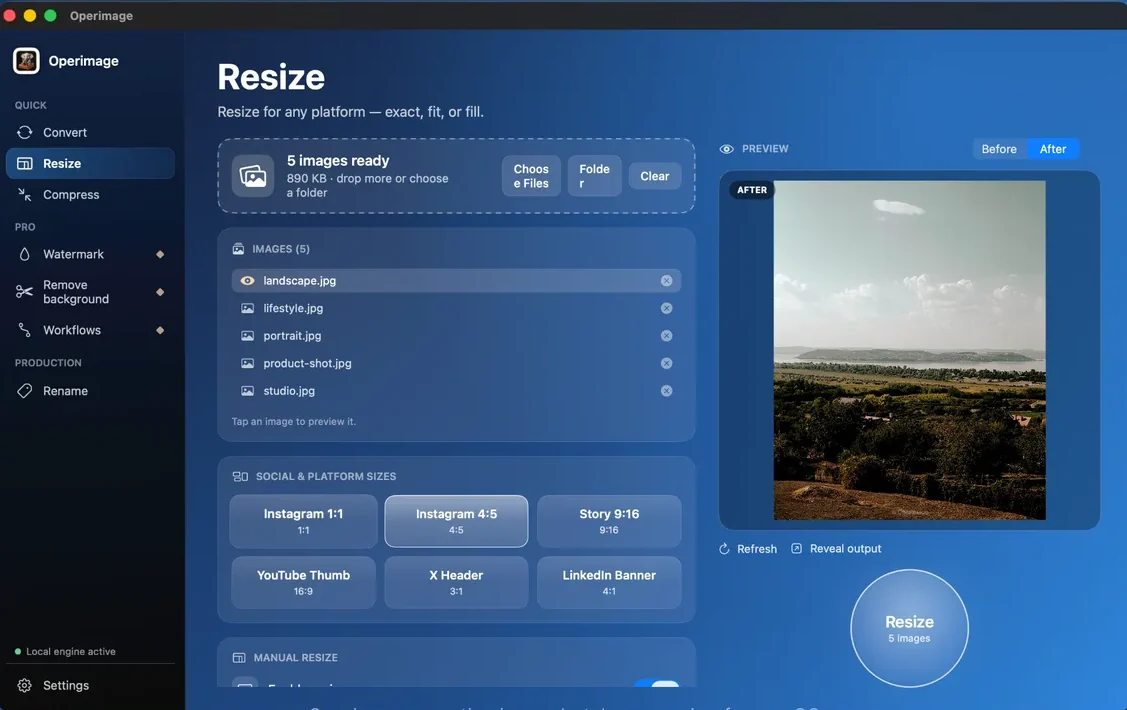
Operimage, a free Mac app, does the crop and the resize in one pass. Open Resize, drop in the slides or choose the folder, and pick Story 9:16 under Social & platform sizes. That preset produces 1080 × 1920, the same size TikTok uses for full-screen photos. Set the mode to Fill so every slide is exactly 9:16, then click through the images in the Before/After preview to check that faces and text sit in the upper middle.
Click Resize and Operimage writes new copies, leaving your originals untouched; Reveal output opens them in Finder, ready to AirDrop to your phone. For 4:5 slides, choose Manual resize and enter 1080 × 1350 instead. The batch resizing guide for Mac explains Fit and Fill in more detail.
A repeatable TikTok carousel workflow
Carousels are sequences, so order matters as much as size. After resizing, rename the slides in bulk with a counter, such as recipe-01.jpg to recipe-12.jpg, so they appear in the right order in your camera roll and in the TikTok picker.
In Operimage, save the sequence as a Workflow: resize to Story 9:16, compress to JPEG at high quality, then rename with a counter. The next carousel takes one drop and one click. If the same content also goes to Pinterest, run the originals through a second Workflow at 1000 × 1500; the Pinterest Pin size guide explains why Pinterest wants 2:3 instead of 9:16.
- 1Photo set12 edited photos, mixed orientation
- 2Resize with FillStory 9:16, 1080 × 1920
- 3Rename with counterslide-01.jpg to slide-12.jpg
- 4Post in TikTokPhoto → select in order
Why do my TikTok photos look blurry, zoomed or cropped?
Most TikTok image problems come from size and shape. Work through these causes before re-editing the photos themselves.
- Blurry slides: the source was smaller than 1080 pixels wide, or it was a screenshot of a screenshot. Start from the original file.
- Soft text: very large images are downsized and recompressed. Export at 1080 × 1920 with high JPEG quality.
- Photo looks zoomed in: TikTok or your editor filled the screen by cropping. Prepare 9:16 files so nothing needs to be cropped.
- Tiny photo in the middle of the screen: the slide was landscape. Crop it to 9:16 or 4:5 before uploading.
- Text hidden under the caption: move it out of the bottom fifth of the frame or shorten the caption.
- Colors look washed out: export in sRGB rather than Display P3.
Step by step
Open Resize and load the slides
In Operimage, choose Resize in the sidebar and drop in the photos for the post, or click Folder to load them all.
Choose Story 9:16
Under Social & platform sizes, select Story 9:16 for full-screen 1080 × 1920 slides, or use Manual resize with 1080 × 1350 for 4:5 slides.
Set Fill and check each crop
Fill makes every slide exactly the target size. Click through the list in the Before/After preview and make sure faces and text stay in the upper middle of the frame.
Resize and reveal the output
Click Resize, then Reveal output to open the 1080 × 1920 copies in Finder. Originals stay untouched.
Number the slides and upload
Rename the files in posting order, such as slide-01.jpg, then AirDrop them to your phone and add them in TikTok with Photo or Upload.
FAQ
What size should TikTok photos be?
1080×1920 pixels at a 9:16 aspect ratio. That size fills the whole screen in a TikTok photo post.
How many photos can you post on TikTok at once?
TikTok allows up to 35 photos in a single photo post. Viewers swipe through them in order.
What aspect ratio is a TikTok carousel?
9:16 fills the screen and is the recommended ratio. 4:5 and 1:1 slides also work but appear smaller with empty space around them.
Why are my TikTok photos cropped?
Photos that are not 9:16 get scaled or cropped to fit the screen. Resize every slide to 1080×1920 before uploading so TikTok has nothing to crop.
What is the TikTok profile picture size?
TikTok's minimum is 20×20 pixels, but a square of at least 400×400 pixels stays sharp. The photo is displayed as a circle, so keep the subject centered.
What file format does TikTok accept for photos?
TikTok's developer documentation lists JPEG and WebP, up to 20 MB per image. JPEG is the safest choice for scheduling tools and desktop uploads.
Can I resize photos for TikTok on a Mac in bulk?
Yes. Operimage, a free Mac app, resizes a whole folder to 1080×1920 with its Story 9:16 preset, entirely on your Mac.