AVIF vs WebP: the short answer
AVIF produces smaller files than WebP at the same visual quality in most comparisons, often by a meaningful margin on detailed photographs. WebP encodes faster, has been supported for longer and is accepted by more tools outside the browser. Both formats are supported by every current major browser and both handle transparency.
That leads to a simple rule. If you want one modern format with no extra complexity, choose WebP. If page weight is your top priority and you can serve a fallback, use AVIF first with WebP or JPG behind it. Either one is a large improvement over serving JPG and PNG. Converting between all of these is covered in the Mac image format converter hub, which this comparison belongs to.
Typical photo file size relative to JPEG
What are AVIF and WebP?
WebP is an image format released by Google in 2010, derived from the VP8 video codec. It offers lossy compression for photos, lossless compression for graphics, transparency and animation. Google's published study found lossy WebP 25–34% smaller than JPEG at equivalent quality and lossless WebP about 26% smaller than PNG.
AVIF (AV1 Image File Format) was published by the Alliance for Open Media in 2019 and is based on the newer AV1 video codec. It supports lossy and lossless compression, transparency, animation, 10- and 12-bit color, HDR and full-resolution color (4:4:4). Its compression is more advanced than WebP's, which is where the extra savings come from, and also why it takes more computing time to encode.
AVIF vs WebP feature comparison
| Feature | WebP | AVIF |
|---|---|---|
| Released | 2010 (Google) | 2019 (Alliance for Open Media) |
| Based on | VP8 video codec | AV1 video codec |
| Typical size vs JPEG | About 25–34% smaller | Often around 50% smaller |
| Transparency | Yes | Yes |
| Animation | Yes | Yes |
| Lossless mode | Yes | Yes |
| Bit depth / HDR | 8-bit only | 8, 10 and 12-bit, HDR |
| Color resolution (lossy) | 4:2:0 only | 4:2:0 or full 4:4:4 |
| Maximum dimensions | 16,383 × 16,383 px | Large images stored as tiled grids |
| Encode speed | Fast | Slower, often several times |
| Opens natively on Mac | macOS 11 and later | macOS 13 and later |
Which is smaller and which looks better?
For photographs, AVIF usually wins on size at a given perceived quality, and the gap grows as you push file size down. At aggressive settings WebP tends to show blockiness and banding in skies and gradients, while AVIF degrades more gracefully, smoothing fine texture instead. That makes AVIF especially attractive for large hero images and photo-heavy galleries.
For flat graphics, logos, screenshots and UI, the gap narrows and sometimes reverses. Lossless WebP is very efficient on flat color, and simple graphics compress well in any modern format. One area where AVIF has a real edge is colored text and thin colored lines: lossy WebP always stores color at half resolution, while AVIF can keep full color resolution, so red or blue text stays crisper.
The honest test is your own images at your own target size. A format that wins a benchmark can lose on your catalog, so compare both on a representative sample before you standardize.
AVIF
Smallest files
- Smallest files for detailed photos
- Cleaner gradients at low file sizes
- Full-resolution color and HDR available
- Slower to encode, fewer tools accept it
WebP
Simplest everywhere
- Fast to encode, even for big batches
- Accepted by more CMSs and upload forms
- Efficient lossless mode for flat graphics
- Opens on older Macs (macOS 11+)
Verdict: WebP is the safe single-format default; AVIF is worth adding where page weight matters most.
Browser support for AVIF and WebP in 2026
WebP is supported in Chrome, Edge, Firefox and Opera, and in Safari since version 14 (2020). AVIF arrived in Chrome 85 (2020), Firefox 93 (2021), Safari 16 (2022, on macOS Ventura and iOS 16) and Edge 121 (2024). In practice, every current major browser displays both formats, so the difference only matters for visitors on old devices that no longer receive updates.
Support outside the browser is where they differ more. WebP opens in Preview from macOS 11 and AVIF from macOS 13. WordPress accepts WebP from version 5.8 and AVIF from 6.5, both dependent on the server's image library; the WordPress image optimization guide explains the checks. Many marketplaces, email clients and desktop apps accept neither and still want JPEG or PNG, so neither format replaces your masters.
Serving AVIF with a WebP or JPG fallback
You do not have to choose only one. The standard pattern uses the HTML picture element: a source with type image/avif first, a source with type image/webp second, and a normal img tag pointing to a JPG last. Each browser downloads the first format it supports, so modern browsers get AVIF and everything else still sees an image.
Many image CDNs and WordPress plugins do the same automatically by reading the browser's Accept header and returning AVIF or WebP from a single uploaded master. If your platform already does this, you may not need to create the files yourself; upload high-quality JPG or PNG masters and let the CDN encode.
If you create the files yourself, keep the base file name identical across formats, such as hero.avif, hero.webp and hero.jpg, so templates can swap extensions without extra mapping.
- 1AVIF sourceUsed by browsers that support AVIF
- 2WebP sourceUsed if AVIF is not supported
- 3JPG imgLast-resort fallback for everything else
Encode speed and workflow cost
AVIF's better compression comes at a computing cost. Encoding AVIF typically takes several times longer than WebP at comparable settings, and the gap is larger for big images and slower encoder settings. For a one-off batch on a Mac that means waiting a bit longer. For a server that resizes and encodes images on demand, it can mean higher CPU load and slower first requests.
Decoding is fast enough on modern phones and computers that visitors rarely notice a difference. The practical costs of AVIF are on your side: longer batch times, more formats to store and a fallback to maintain. If that overhead buys you a meaningful drop in page weight, it is worth it; if your images are mostly small thumbnails or graphics, it may not be.
Transparency, animation and HDR
Both formats replace PNG for transparent web images. Product cutouts, illustrations and logos with soft shadows can be served at a fraction of the PNG size in either format. AVIF is usually smaller for photographic cutouts; WebP is faster and simpler. Both guides cover the edge checks that matter: transparent PNGs to AVIF and the WebP hub for opening and creating WebP files.
Both formats support animation and are far smaller than animated GIF. For anything longer than a few seconds, a muted, looping video file is often smaller still. AVIF also supports HDR and 10- or 12-bit color; WebP is limited to 8-bit standard range. That matters for HDR photography but not for typical product, blog or UI images.
Does AVIF or WebP help SEO and Core Web Vitals?
Image format is not a ranking factor in itself, but page speed is part of how search engines judge page experience, and images are often the largest element on a page. The Largest Contentful Paint metric frequently measures a hero image, so a smaller hero file can directly improve it. Moving from JPG to WebP or AVIF is one of the most commonly recommended fixes in page speed audits for exactly that reason.
The format switch is only part of it. An oversized image in AVIF is still oversized. Serve images at the dimensions they are displayed, give them width and height attributes to avoid layout shift, and lazy-load images below the fold. With those basics in place, choosing AVIF over WebP shaves off the remaining kilobytes.
How to compare quality settings fairly
Quality numbers are not comparable across formats. WebP at 80% and AVIF at 80% are not the same visual quality, and AVIF generally looks comparable at noticeably lower numbers. Comparing both formats at the same number makes AVIF look bigger than it needs to be.
A fair test fixes one variable. Either match visual quality, lowering each format until you can just see a difference at 100% zoom and then stepping back up, and compare file sizes; or match file size and compare which looks better. Use the same resized source images for both, and judge at the size the images will actually be displayed rather than zoomed far beyond it.
How to create AVIF and WebP files on a Mac
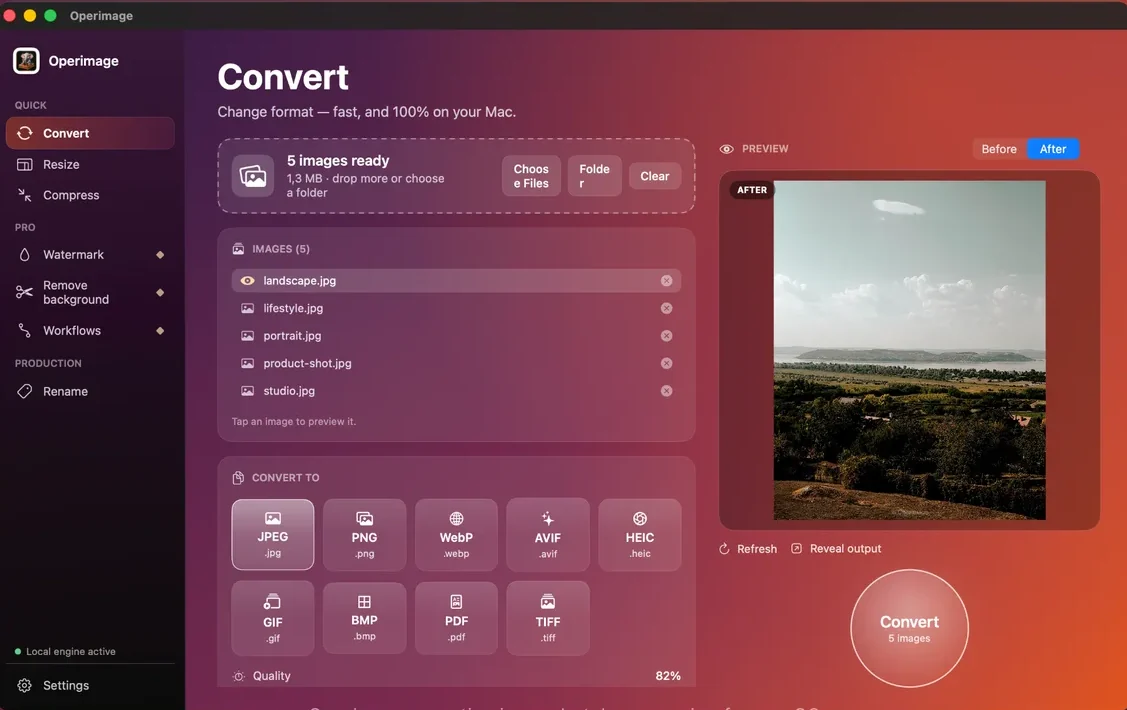
macOS can open both formats on current versions, but Preview, Finder Quick Actions, Shortcuts and sips cannot save either. Command-line users can install Google's cwebp (brew install webp) and libavif's avifenc (brew install libavif). For a visual workflow, Operimage, a free Mac app, outputs both WebP and AVIF from its Convert tool, processes everything on your Mac and keeps your originals untouched.
The quickest fair comparison: load the same test folder twice, export once as WebP at about 80% and once as AVIF at about 65%, and compare quality and folder totals. Detailed settings for each path are in the guides to encoding JPG photos as AVIF and saving JPG photos as WebP.
Which format should you choose? A decision guide
Use these rules of thumb, then confirm on your own images. Whatever you choose, resizing images to their displayed dimensions and compressing sensibly usually saves more than the format decision itself; the guide to compressing images on Mac covers that side.
- One format, minimal setup: WebP at 75–82% for photos.
- Image-heavy pages where Largest Contentful Paint matters: AVIF with a WebP or JPG fallback.
- Product cutouts with transparency: WebP by default, AVIF where tests show a clear saving.
- Screenshots and UI with small text: lossless WebP or PNG; test AVIF for colored text.
- Files for marketplaces, email or print: neither; use JPG or PNG.
- HDR photography: AVIF, since WebP cannot store HDR.
Before switching your site to AVIF
- Your CMS or CDN accepts and serves AVIF
- A WebP or JPG fallback is in place
- Test images show a clear size saving over WebP
- Batch encode time is acceptable for your library size
- Text, gradients and edges pass a 100% zoom check
- Original JPG and PNG masters are kept
Step by step
Pick 10–20 representative images
Choose a mix of what your site really uses: detailed photos, portraits, product cutouts and screenshots, resized to their display size.
Export a WebP set
In Operimage, choose Convert, add the test folder, select WebP at about 80% quality and click Convert.
Export an AVIF set
Load the same images again, select AVIF at about 65% quality and convert into a separate output folder.
Compare quality side by side
Use the Before/After preview and open both outputs at 100% zoom, checking texture, gradients, edges and text.
Compare total file size and decide
Use Reveal output and Finder's Get Info to compare folder totals. If AVIF saves little, standardize on WebP.
FAQ
Is AVIF better than WebP?
AVIF usually produces smaller files at the same visual quality, especially for detailed photos. WebP encodes faster and is accepted by more tools, so it is better when simplicity matters more than the last few kilobytes.
Do all browsers support AVIF?
Every current version of Chrome, Firefox, Safari and Edge supports AVIF. Safari added it in version 16 in 2022, and Edge in version 121 in 2024.
Should I use AVIF or WebP for my website?
Use WebP if you want a single format with minimal setup. Use AVIF with a WebP or JPG fallback if page weight is your priority and you can serve multiple formats.
How much smaller is AVIF than WebP?
It depends on the image. On detailed photos AVIF is often noticeably smaller than WebP at the same quality, while on flat graphics and screenshots the difference can be small.
Does AVIF support transparency like WebP and PNG?
Yes. Both AVIF and WebP support transparent backgrounds and animation, so either can replace PNG and GIF on the web.
Why is AVIF slower to create than WebP?
AVIF uses the more complex AV1 compression tools, which take more computing time to find the most efficient encoding. Decoding in the browser is fast.
Is JPEG still needed if I use AVIF or WebP?
Keep JPEG as a fallback and for places that do not accept modern formats, such as many marketplaces, email clients and print services.